Blog

How to Choose the Right Gemini AI Model: A Quick Guide

How to Choose the Right Gemini AI Model: A Quick Guide

    For most business work, start with Gemini 4 Hydrogen, Google’s new fast, efficient model for everyday coding and agent work, and step up to Gemini 4 Argon for harder reasoning, long documents and serious coding. Save Gemini 4 Carbon, Google’s strongest model, for problems that truly test the limits of reasoning. Use Gemini 3.5 Flash-Lite when speed and cost per request matter most. Already running Gemini 3.8 Flash? It’s still available, so you can test Hydrogen on your own prompts before you switch.

    Updated November 13, 2026: We’ve added Gemini 4 Hydrogen, which Google released on November 12 and now recommends as the starting point for everyday apps and agents, in place of Gemini 3.8 Flash. Gemini 3.8 Flash hasn’t been retired. The rest of the guide has been updated to match.

    Google’s Gemini lineup has changed a lot since this guide first ran in October 2024. The Gemini 1.5 models it covered are no longer part of Google’s current lineup, and Google has shipped a new Gemini model every month since July 2026, two of them in the past week alone. This guide covers the models that matter for business today, what each is best at, and where your teams can actually use them.

    The current Gemini models at a glance

    These are the four general-purpose models in Google’s own comparison, plus Gemini 3.8 Flash, which many teams still run today. Speed labels are Google’s.

    ModelBest forSpeedContextStatus
    Gemini 4 Hydrogengemini-4-hydrogenThe new everyday default. Coding, tool-using agents, interactive apps and multimodal document work, with speed and efficiency.Fast1M tokensOutput up to 64K, or 1M with long decodeStableNovember 2026
    Gemini 4 Argongemini-4-argonMost advanced software engineering and knowledge work. Faster and fewer tokens per turn than Carbon.Moderate1M tokensOutput up to 64K, or 1M with long decodeStableOctober 2026
    Gemini 4 Carbongemini-4-carbonGoogle’s strongest model. Complex multi-step coding and debugging, architecture design, dense document synthesis, scientific and security analysis.Deliberate1M tokensOutput up to 64K, or 1M with long decodeStableNovember 2026
    Gemini 3.5 Flash-Litegemini-3.5-flash-liteHigh-volume work where latency and cost come first: classification, data extraction, routing, simple agent steps.Fastest1M input tokens64K outputStableJuly 2026
    Gemini 3.8 Flashgemini-3.8-flashThe previous everyday default. Still available, with no shutdown date announced, but Google now points new and migrating work to Hydrogen.Fast1M input tokens64K outputStableSeptember 2026

    Model names, specs and status from Google’s Gemini API model pages and the Gemini 4 Hydrogen model page. Gemini 3.1 Pro is still offered in the Gemini API as a preview model (gemini-3.1-pro-preview). Google also offers specialized Gemini models for live voice (Gemini 3.8 Live), speech, images (Nano Banana) and video (Gemini Omni).

    What changed with Gemini 4 Hydrogen

    Google describes Gemini 4 Hydrogen as a fast, efficient model for everyday coding and agentic workflows. Carbon and Argon are built for deep, long-horizon reasoning. Hydrogen is built to get work done quickly, either on its own or alongside them.

    Three things matter most for business teams:

    • It replaces Gemini 3.8 Flash as Google’s starting point. Google’s Hydrogen developer notes call it the recommended upgrade from Gemini 3.8 Flash and earlier Gemini 3 and 2.5 models. In Google’s launch post, it’s positioned as both faster and more capable than 3.8 Flash, and less likely to make up facts when context is missing.
    • It’s part of the Gemini 4 family. Hydrogen shares the same 1 million token context window, long outputs and built-in tools as Carbon and Argon, so moving work between the three is simpler than moving between model generations.
    • It’s designed to work alongside the bigger models. A common pattern is to let Carbon plan the work or untangle a hard problem, then hand the code edits, tests and parallel tasks to Hydrogen. Google Antigravity now does this automatically with a new Orchestrator that switches between models like Carbon and Hydrogen in the same session, and the Antigravity agent in the Gemini API now uses Hydrogen by default.

    What this means for Gemini 3.8 Flash. Nothing breaks today. Google’s Gemini API deprecations page lists gemini-3.8-flash with no shutdown date announced, and on Google Cloud it’s listed as available until at least September 2, 2027. It’s simply no longer the model Google recommends you start with.

    How to choose the right Gemini model

    Pick by the job, not the version number. Each tier trades speed and cost per request against depth of reasoning.

    • Drafting, summarizing, research, everyday coding and tool-using agents: Gemini 4 Hydrogen. It’s quick enough for interactive use and capable enough for multi-step work across documents, spreadsheets and code.
    • Analysis across long documents, complex coding and multi-step agents: Gemini 4 Argon. Google calls it the ideal choice for the majority of software engineering and knowledge work.
    • The hardest problems, where quality matters more than speed: Gemini 4 Carbon. It spends more thinking tokens per turn to explore and verify its work, so expect longer response times and higher token use than Argon.
    • High-volume pipelines such as tagging, extraction and ticket routing: Gemini 3.5 Flash-Lite, which Google still recommends for high-volume classification, routing and sub-second latency targets.
    • Voice agents, images and video: use the specialized models (Gemini 3.8 Live, Nano Banana, Gemini Omni) rather than a text model.

    Then test. Run a sample of your own real prompts through two candidate models and keep the cheapest one that meets your quality bar. Every model above also lets you set a thinking level. Hydrogen offers low, medium, high (its default) and a new xhigh level for the hardest multi-step tasks, while Carbon and Argon default to medium and go up to high. Google’s advice is to evaluate each level and pick the lowest one that works.

    Already on Gemini 3.8 Flash? There’s no rush, but it’s worth planning the move. Try Hydrogen on the same prompts you use today and compare quality, speed and token use before you switch production traffic. Changing the model name isn’t quite enough on its own. Google’s migration checklist lists a few behavior changes to test for, including a different default thinking level and changes to caching and sampling settings.

    Choosing models for a specific workflow, like support triage or contract review? We build working demos against your own data and use cases, so you can compare options before you commit. See how our Gemini deployment services work.

    Tokens and context windows, briefly

    Gemini reads and writes in tokens. For Gemini models, Google puts a token at about 4 characters, so 100 tokens is roughly 60 to 80 English words. Images, audio, video and PDFs are converted into tokens too.

    The context window is how much the model can consider at once. Every model above takes about 1 million tokens, which is enough for very long contracts, large codebases or hours of transcripts in a single request. On the Gemini 4 models (Hydrogen, Argon and Carbon), that window is shared between input, thinking and output. Context size rarely decides the choice anymore. Speed, quality and cost per request do, and on the API, input, output and thinking tokens all count toward cost.

    Where businesses use Gemini

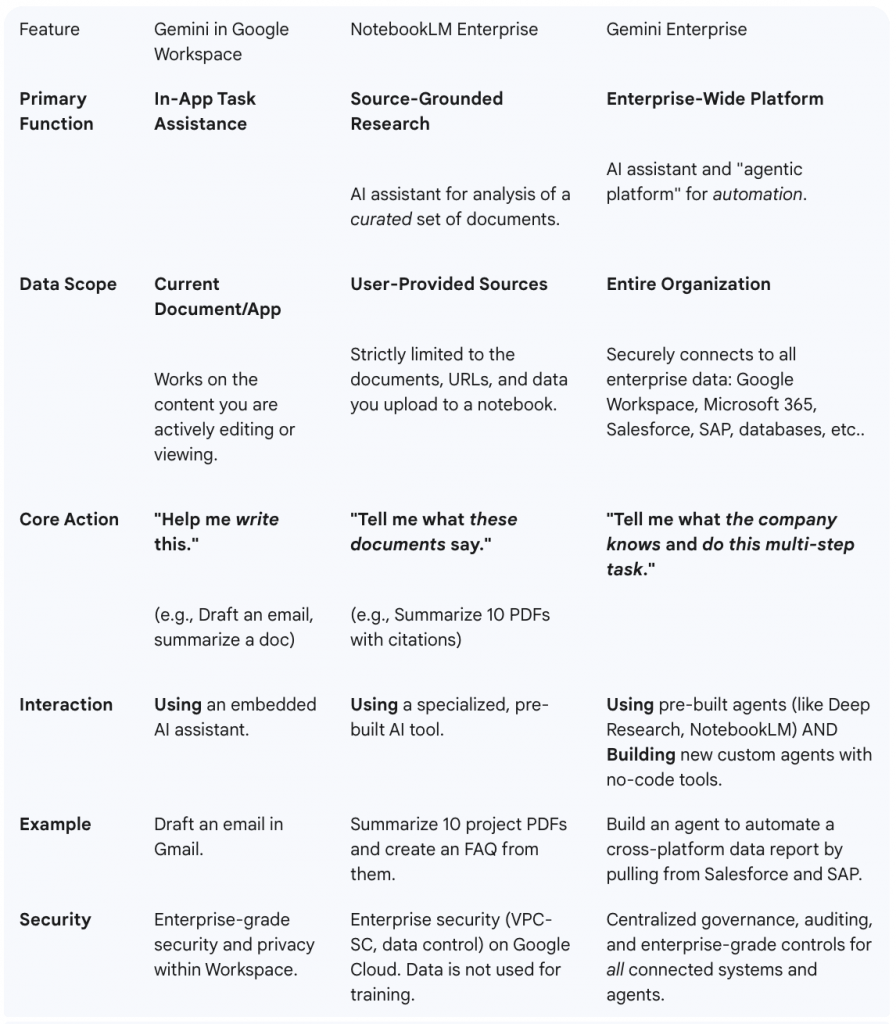
    The same model family shows up in several Google products, with different controls, licensing and model choice in each. New models usually reach these products at different times, so it’s worth checking what’s switched on for your organization.

    WhereWho it’s forModel choice
    Google Workspace with GeminiEveryone, inside Gmail, Docs, Sheets, Meet and the Gemini appGemini is built into the apps. The Gemini app offers Fast, Thinking and Pro modes on Business and Enterprise editions; Gemini 4 Argon needs the AI Expanded Access add-on. Google says Hydrogen is rolling out to the Gemini app and to Gemini in Google Sheets for eligible business subscriptions.
    Gemini for businessBusiness, Standard or Plus editionsTeams that need agents, company data connectors and governanceAdmins choose which models users can select. Gemini 3.8 Flash and Gemini 4 Argon are on by default; Gemini 4 Carbon and Gemini 4 Hydrogen are available and off by default in the web and mobile app. In Antigravity, Hydrogen is on by default when you use the standard model list.
    Google AI Studio and the Gemini APIDevelopers prototyping and building appsThe full lineup, including preview models. Try any model with your own prompts before you build.
    Gemini platform on Google CloudFormerly Vertex AIProduction apps and agents that need Google Cloud security, IAM and billingGemini 4 Hydrogen, 4 Argon, 4 Carbon, 3.8 Flash and 3.5 Flash-Lite are generally available in the model catalog.

    Most organizations end up using more than one of these. Which editions to license, which models to switch on, and how data access and governance should work are the questions we work through with teams in an AI Discovery Session, the first step of our Gemini deployment services. If you’re still weighing the app options, this comparison of Gemini for business and Gemini in Workspace goes deeper, and our Antigravity for Business guide covers Gemini for software teams.

    Frequently asked questions

    What is the best Gemini model right now?

    Gemini 4 Carbon is Google’s strongest model. Google describes Gemini 4 Argon as ideal for most advanced software engineering and knowledge work tasks. Gemini 4 Hydrogen is now Google’s recommended default for everyday coding, agents and multimodal work. The best model is the cheapest one that does your task well.

    What is Gemini 4 Hydrogen?

    Gemini 4 Hydrogen is a fast, efficient Gemini 4 model that Google released on November 12, 2026 for everyday coding and agentic workflows. It shares the 1 million token context window and built-in tools of Carbon and Argon, adds a fourth thinking level (xhigh), and is Google’s recommended upgrade from Gemini 3.8 Flash. See Google’s announcement for details.

    Has Gemini 4 Hydrogen replaced Gemini 3.8 Flash?

    As Google’s recommended starting point, yes. As a product, no. Gemini 3.8 Flash is still available in the Gemini API with no shutdown date announced, and on Google Cloud it’s listed as available until at least September 2, 2027. Existing apps keep working, so you can test Hydrogen and move when you’re ready.

    What is the difference between Gemini 4 Argon and Gemini 4 Carbon?

    They share the same 1 million token context window, built-in tools and per-token pricing. Carbon spends more thinking tokens per turn, which makes it slower and more expensive per task, in exchange for deeper reasoning on the hardest problems.

    Which Gemini model is the fastest?

    Gemini 3.5 Flash-Lite is the fastest in Google’s comparison and is designed for high-volume, cost-sensitive work. Gemini 4 Hydrogen is the fast option when the task needs more capability.

    Are Gemini 1.5 and 2.5 models still available?

    The Gemini 1.5 models are no longer in Google’s lineup. In the Gemini API, Gemini 2.5 Pro and 2.5 Flash are deprecated: from December 1, 2026, requests to gemini-2.5-pro route to Gemini 3.8 Flash and requests to gemini-2.5-flash route to Gemini 3.5 Flash-Lite. Gemini 2.5 Flash-Lite isn’t affected on the API and remains available until further notice. If you have apps on the deprecated models, update the model name and re-test before then. If you’re making that change anyway, Google now recommends Gemini 4 Hydrogen as the upgrade from 2.5 and earlier Gemini 3 models.

    On Google Cloud (the Gemini platform), gemini-2.5-pro, gemini-2.5-flash and gemini-2.5-flash-lite already retired on October 20, 2026; the recommended upgrades are gemini-3.8-flash, or gemini-3.5-flash / gemini-3.5-flash-lite.

    Which Gemini model does Google Workspace use?

    Workspace plans describe Gemini by mode rather than model version. In the Gemini app, Business and Enterprise editions include Fast, Thinking and Pro modes, and Gemini 4 Argon is available with the AI Expanded Access add-on. Google says Gemini 4 Hydrogen is rolling out to the Gemini app and to Gemini in Google Sheets for eligible business subscriptions. Your Admin console shows what your edition includes.
    Read article
    Google Antigravity for Business: Security, Plans and a Safe Team Rollout

    Google Antigravity for Business: Security, Plans and a Safe Team Rollout

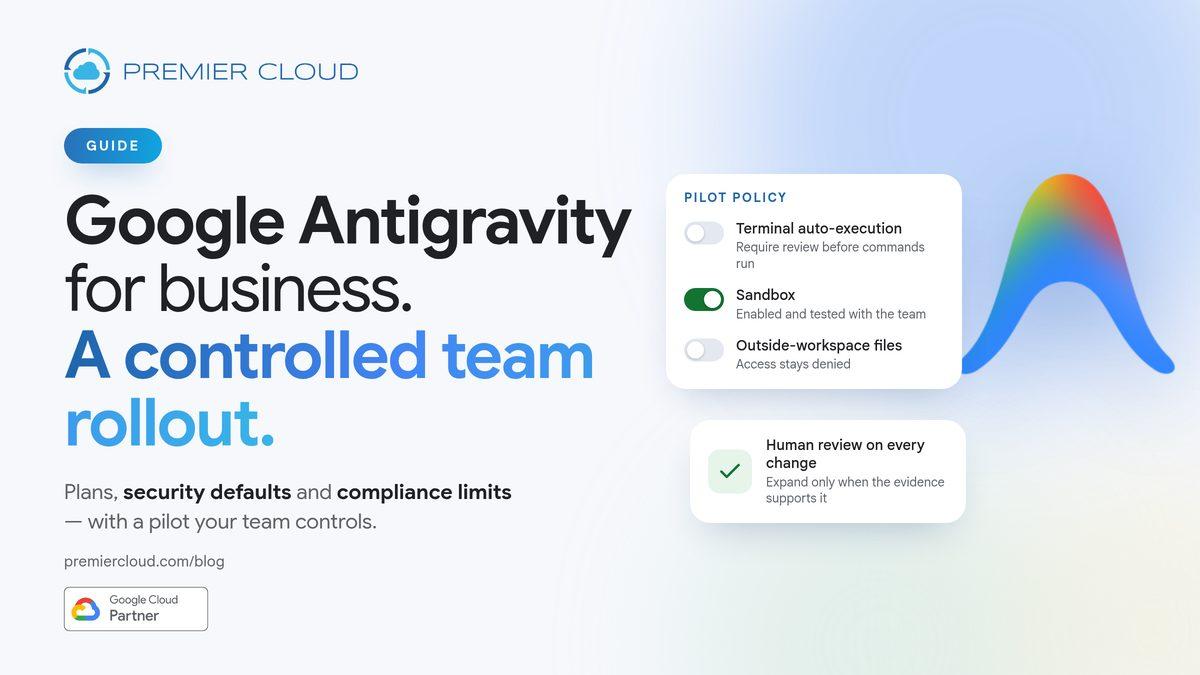
      Pilot now if you can isolate low-risk repositories, buy Gemini Enterprise Standard or Plus on Google Cloud, and assign an engineering owner with security oversight. Wait if required compliance coverage is missing, credentials cannot be isolated, or nobody can review agent actions. We recommend proving control before expanding autonomy.

      What is Google Antigravity—and what is it not?

      Google Antigravity is an agentic development platform: agents can plan, execute and verify software tasks across an editor, terminal and browser. It is not Gemini chat or simply a Gemini Code Assist rename. This guide is for Antigravity enterprise teams getting started on Google Cloud—access paths, pilot billing and controls—not a consumer Pro/Ultra walkthrough. Google’s Antigravity launch announcement explains the agent-first approach. Enterprise sign-in options are set out in the enterprise setup guide.

      For a business pilot, use the Antigravity App, Antigravity CLI or Antigravity IDE extensions. Business sign-in is generally available for the VS Code and Visual Studio extensions, and still in Preview for JetBrains, Zed, Xcode and Eclipse. The standalone Antigravity IDE is not supported for enterprise deployments, according to Google’s Antigravity enterprise setup guide. Do not assume every downloadable surface supports the same account or terms.

      Antigravity on Google Cloud: which access path fits?

      Antigravity on Google Cloud is the path that matters when people search for “Antigravity cloud”: you run Antigravity under Cloud identity, billing and admin controls instead of a personal Google AI plan. The table below is how to choose that path.

      The important buying decision is not the largest personal quota. It is which terms, data protections, billing model and administrative controls apply.

      Access pathWhat to know
      Consumer Google AI Pro / UltraIndividual terms. Fine for approved, non-sensitive experimentation; not a substitute for business governance.
      Gemini Enterprise Standard or Gemini Enterprise Plus (seat-licensed)Includes pooled AI developer tools credits for first-party Gemini models. No separate per-user Antigravity license. This guide’s focus.
      Pay-as-you-go edition on Google CloudUsage-priced, with no bundled monthly AI developer tools credits. Verify your Cloud Billing account type and set spend limits before use.

      Some eligible customers can also use a Standard Emerging Market edition, which does not include default bundled AI developer tools credits; confirm eligibility with your Google account team.

      Not every edition labelled “business” includes AI developer tools. On Google’s edition comparison, the similarly named Gemini Enterprise Business edition does not include them. AI developer tools are listed for the Gemini Enterprise Standard and Gemini Enterprise Plus and for Pay-as-you-go. Check that table before you buy.

      Trial subscriptions do not include AI developer tools. Confirm a paid, non-trial subscription before pilot kickoff. Access is also rolling out to select customers, so confirm your location and rollout status too.

      Google covers consumer vs Cloud terms on its Antigravity plans page and pooled credits on its credit and pay-as-you-go above-quota rules. Included credits are enforced as a rolling seven-day shared pool and do not roll over. They are not unlimited usage.

      Scope of this guide: The step-by-step pilot below assumes paid, seat-licensed Gemini Enterprise Standard or Gemini Enterprise Plus subscriptions. Pay-as-you-go and API-key access are also valid paths, but their billing and control model is different and outside this guide’s scope. Most of the security settings below still apply.

      Prices, quotas, models and rollout access change often. Recheck Google’s model catalog and quota rules before procurement and again before launch.

      How should you buy it, and how is a pilot billed?

      Buying through Gemini Enterprise on Google Cloud rather than a personal plan is the decision that gets you central admin controls, business terms and pooled credits; the rest is choosing an edition and setting limits. Included credits are not a spending cap. Plan for these billing behaviors, documented in Google’s credit and pay-as-you-go above-quota rules and AI developer tools settings:

      • First-party Gemini usage above the pool: When the pooled credits run out, usage stops until the weekly reset unless an administrator turns on pay-as-you-go usage above quota. Once that setting is on, further Gemini usage is billed at Agent Platform rates.
      • Third-party models: Claude models are pay-as-you-go only and require pay-as-you-go usage above quota to be turned on. Pooled credits do not cover them.
      • Hybrid and background charges: Even when a developer selects a third-party model, Antigravity keeps using lightweight Gemini models in the background for coordination, and a Gemini image model for image generation. That usage can also incur charges.
      • Monthly project spend limit: Set one. Google says it applies to all models, including third-party models.

      Billing lands on prepaid credits for self-serve Cloud Billing accounts or on the monthly invoice for invoiced accounts. Name a budget owner and review consumption weekly.

      Does Antigravity train on your code?

      It depends on the subscription and terms, not on which login screen a developer uses. Under the Antigravity terms, individual consumer interactions may be used to improve Google products and machine-learning technologies, with possible human review. Turning off telemetry does not stop processing needed to provide and protect the service.

      On the supported Gemini Enterprise Cloud subscription path, use is governed by the Google Cloud terms your administrator accepted. Under those terms, Google’s enterprise data-use statement says corporate data is not used for training. Prompts sent to administrator-enabled third-party models are also not used for training, per the settings documentation. During onboarding, verify that each developer signs in with the business account option against a licensed project. A work email address alone does not prove that.

      Two caveats:

      • Marketplace: Google’s terms state that enterprise or other signed or accepted terms do not apply to the Antigravity Marketplace. Treat Marketplace items as a separate approval decision.
      • Data residency is limited: Business endpoints are available in global, us and eu locations. Global endpoints are still required for license discovery, and preview models and image generation are global-only. Third-party model inference runs in global, us or eu only, with no in-country regions (enterprise setup guide).

      “No training” does not mean “no governance needed.” Decide what code, prompts, outputs and logs may contain before granting access.

      Which security settings should you change first?

      The defaults are not uniformly restrictive. Google’s AI developer tools settings document terminal auto-execution as Always proceed and sandbox mode as Disabled by default. Outside-workspace file access defaults to Deny.

      ControlPilot setting
      Terminal auto-executionRequire review
      Sandbox modeEnabled; test isolation
      Outside-workspace file accessKeep Deny
      Browser accessOff unless needed; then on with explicit Allowed URLs
      Browser JavaScriptDisabled or Request review
      MCP serversOff, or named servers on an allowlist
      Third-party modelsOff until security and budget approval
      Prompt/response and metadata loggingSet deliberately per evidence policy
      /teamwork-previewConsider disabling until evaluated (on by default)
      Monthly project spend limitSet before first use

      Browser access: Turning browser access on without an Allowed URLs list blocks nothing, because no URLs are blocked by default. Enable it only for a task that needs it, with an explicit list.

      ACP IDEs and MCP: IDEs that use the Agent Client Protocol (such as JetBrains IDEs and Android Studio) require MCP to be enabled. In those IDEs, Google says administrator controls are best-effort, because the IDE can inject its own MCP tools that are not subject to enforcement. Keep pilots on surfaces where your policies are fully enforced, or accept that gap explicitly.

      Configure these policies before developers run their first task. Test them with harmless commands; a checked box is not proof that the workflow is contained. Logs are stored in your project, and Google says it does not access them for model training or human review. They can still contain sensitive material, so assign access, retention and incident-response ownership.

      Which compliance requirements rule out a deployment?

      Google states that Antigravity does not support SOC 1, SOC 2, SOC 3, ISO 27001, ISO 42001, FedRAMP Moderate or High, IL4/IL5, ITAR, or Access Transparency. See the AI developer tools overview and limitations and security and compliance controls.

      Do not borrow certifications from the broader Google Cloud subscription. If your workload requires one of these assurances, pause that deployment and involve compliance.

      What belongs in the governance checklist?

      Use this as a pre-access sign-off:

      • Identity and roles: Name the administrator and pilot owner. Configuration needs the Discovery Engine Admin role and day-to-day use needs the Discovery Engine User role; the exact IAM role names are in Google’s AI developer tools overview. The admin role alone does not grant user access.
      • Repository scope: Approve named repositories. Exclude production configuration, customer datasets and unrelated code. Require human pull-request review.
      • Secrets: Remove credentials from pilot fixtures. Use short-lived, least-privilege test credentials; deny production deployment authority.
      • Network: Implement Google’s documented endpoint allowlist rather than broad outbound access.
      • Third-party models, MCP and Marketplace: Review providers, terms, permissions and data flows individually.
      • Cost: Name a budget owner, set the project spend limit and document who approves pay-as-you-go usage above quota.

      How should a phased pilot work?

      We suggest a four-week evaluation, led by one named engineering manager with a security counterpart.

      Phase 1—Prepare: Approve two low-risk repositories, apply the settings above and test access revocation. Establish a baseline using comparable tasks completed without agents.

      Phase 2—Run narrowly: Start with test generation, bug reproduction using synthetic inputs and small refactors, in line with Google’s documented use cases. Keep production access and autonomous merging out of scope.

      Phase 3—Measure: Track accepted changes, correctness, reviewer minutes, rework, elapsed task time and spend. Generated code volume is not a success measure.

      Phase 4—Decide: Expand only if agreed quality and cost thresholds are met, logs support investigation, and no unresolved access violations remain. Stop immediately for secret exposure, unauthorized execution or policy bypass.

      Frequently asked questions

      Can Antigravity enterprise teams use personal Pro or Ultra accounts for company code?

      We recommend Antigravity on Google Cloud with Gemini Enterprise Standard or Plus for proprietary code. Personal subscriptions have different terms and data-use provisions; paying for a consumer tier does not establish business protections.

      Does sandboxing make every task safe?

      No. We still require scoped credentials, reviewed commands and human approval of changes. Treat sandboxing as one layer, not permission to expose production systems.

      Should we promise a productivity uplift?

      No. Set a hypothesis and measure your own results, including review and rework. Expand because your evidence supports it, not because a demonstration looked fast.

      Can we use the standalone Antigravity IDE for our enterprise rollout?

      No. Google says the standalone IDE is not supported for enterprise deployments. Use the App, CLI or IDE extensions, and note that business sign-in is GA for VS Code and Visual Studio but Preview for JetBrains, Zed, Xcode and Eclipse (enterprise setup guide).

      Is Antigravity SOC 2 or ISO 27001 certified?

      No. Google lists SOC 1/2/3, ISO 27001, ISO 42001, FedRAMP Moderate and High, IL4/IL5, ITAR and Access Transparency as not supported for Antigravity. Do not assume the broader Google Cloud subscription’s certifications cover it (limitations).
      Read article
      Gemini at Work 2026: Key Updates and What They Mean for Your Business

      Gemini at Work 2026: Key Updates and What They Mean for Your Business

        Gemini at Work 2026: TL;DR

        On October 8, Google Cloud CEO Thomas Kurian opened Gemini at Work 2026 by introducing the Gemini agent. It’s one agent that answers questions, runs multi-step work, creates content, and writes code, all from a single prompt box. Google also announced that its business AI products now sit under one name: Gemini.

        The timing reflects how far adoption has already moved. Google says nearly 80% of Google Cloud customers now use its AI products. As a Google Cloud Premier Partner, we’ve pulled out the updates that matter most for your business, and what to do about them.

        The key announcements

        One agent for chat, tasks, and code

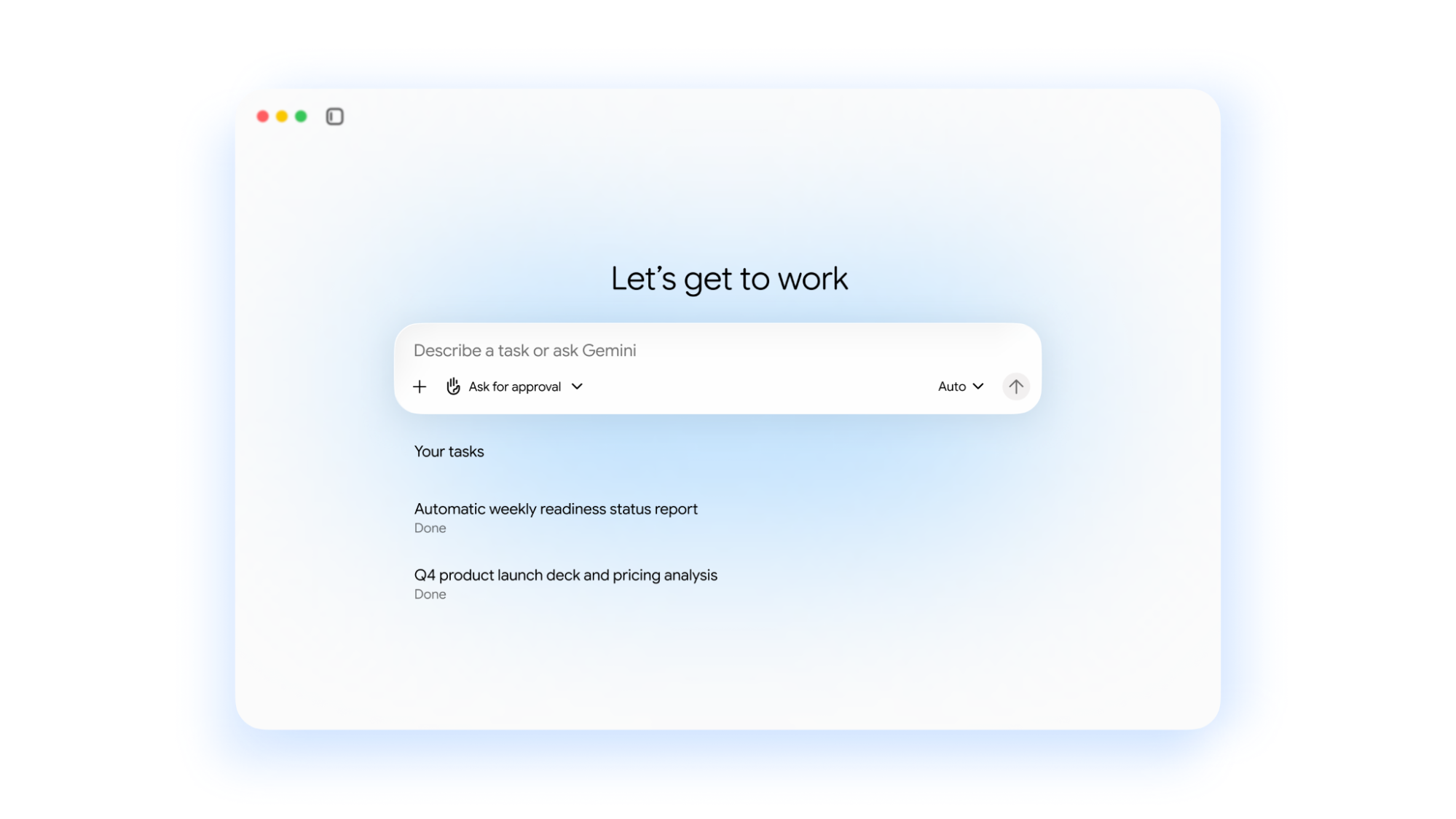
        You give Gemini an objective, not step-by-step instructions. It plans the work, picks the tools it needs, and comes back with something finished. Because it runs in the cloud, long tasks keep going after you close your laptop, and it keeps the same memory across web, mobile, desktop, and the command line. It also connects to Microsoft 365, Slack, Salesforce, ServiceNow, and any MCP server.

        Gemini app home screen with suggested tasks

        One brand: Gemini

        The Gemini Enterprise app, Gemini Enterprise Agent Platform, and Spark are now simply Gemini. Commercial editions keep their names: Gemini Enterprise Business, Standard, and Plus.

        Gemini inside Google Workspace

        Gemini now works inline in Gmail, Docs, Sheets, Slides, Drive, Chat, and Calendar. Ask it to book time with your usual project team and it works out who they are, checks calendars, and starts the thread. It also flags emails it can handle for you, like a request for a status deck.

        Teams can now create coworker agents with their own Workspace account, email, and calendar. Colleagues @mention them in Chat or Docs like anyone else, and they only see what you share with them.

        Model choice with hard cost controls

        Gemini runs each job on the best-fit model, across Google’s Gemini models and Anthropic’s Claude today. Smart Routing sends routine steps to cheaper models. Real-time spend caps in the Cloud Billing Console pause a project’s agent when it hits its limit, and per-project tracking lets you charge AI spend back to departments.

        Security and governance by default

        Every agent gets its own identity, least-privilege permissions, and an audit trail. Agents run in an isolated sandbox, and all traffic passes through Agent Gateway, which applies the policies you write once to every agent in the company.

        Data and industry skills

        Business users can request operational reports in plain language, grounded in BigQuery and the Knowledge Catalog. Saved reports rerun without token costs. Gemini for financial services and Gemini for legal are in preview, with government, healthcare, and retail coming soon.

        What this means for your organization

        AI at work is moving from drafting help to delegated, finished work. That makes three things matter more than which features you turn on:

        • Data readiness. Gemini inherits your existing permissions, so oversharing in Drive becomes an AI problem too. Clean sharing and well-defined data come first.
        • Governance. Agents now act under their own identities. Decide who can create them and what they can touch before teams start building.
        • Budget. Agent workloads grow fast. Set spend caps and routing per project from day one, not after the first surprise invoice.

        How Premier Cloud helps you put Gemini to work

        As a Google Cloud Premier Partner, we help teams take Gemini from trial to production. We can help you:

        • Find the workflows where Gemini pays off first
        • Tighten Workspace sharing and identity before agents inherit them
        • Connect Gemini to your systems of record and ground it in your company data
        • Set up governance, model routing, and spend caps that fit your budget
        • Train your teams to hand off multi-step work, not just write prompts

        Want to see what Gemini could take off your team’s plate? Book a Gemini strategy session with our team.

        Related reading

        Read article
        Google Cloud Cost Optimization: 3 New Strategies for Controlling AI Spend

        Google Cloud Cost Optimization: 3 New Strategies for Controlling AI Spend

          Most cloud cost advice still assumes your bill behaves predictably. Traffic goes up, costs go up. Traffic goes down, costs go down. You right-size a few VMs, delete some orphaned disks, and call it optimization.

          AI workloads broke that assumption.

          A single short prompt can trigger a chain of expensive operations behind the scenes. Requests per second no longer tells you much about what you are about to be charged. A misconfigured retry loop or an unoptimized inference pipeline can burn through a quarter’s budget in an afternoon, and you often will not see it until the invoice reconciles days later.

          Google Cloud has shipped three significant changes to its cost management tooling over the past year that address this directly. None of them appear in the standard cost optimization checklist yet. All three are available now, and all three are worth acting on.

          Here is what changed, and how to put each one to work.

          Strategy 1: Set hard guardrails on AI spend with early anomalies and spend caps

          Budget alerts have always had the same flaw. They tell you something went wrong after it went wrong, and then they wait for a human to react. If the spike happens on a Friday night, you find out Monday.

          Google Cloud now offers two native features in the Billing console that close that gap: early anomalies on AI services, and spend caps on Google Cloud Budgets. Used together, they give you detection and enforcement instead of detection alone:

          Early anomaly detection catches the spike before the invoice does

          Early anomalies sit inside the Anomalies section of your Billing console and monitor daily service-level costs at the project level. Three things make it different from the standard anomaly detection you may already be using:

          • It builds its own baseline. The system analyzes your historical project data to establish expected seasonal cost patterns. There are no thresholds to configure and no numbers to guess at.
          • It works on early cost signals. Rather than waiting for billing data to fully reconcile, it watches cost signals as they emerge and flags movement before the charges are formally reported.
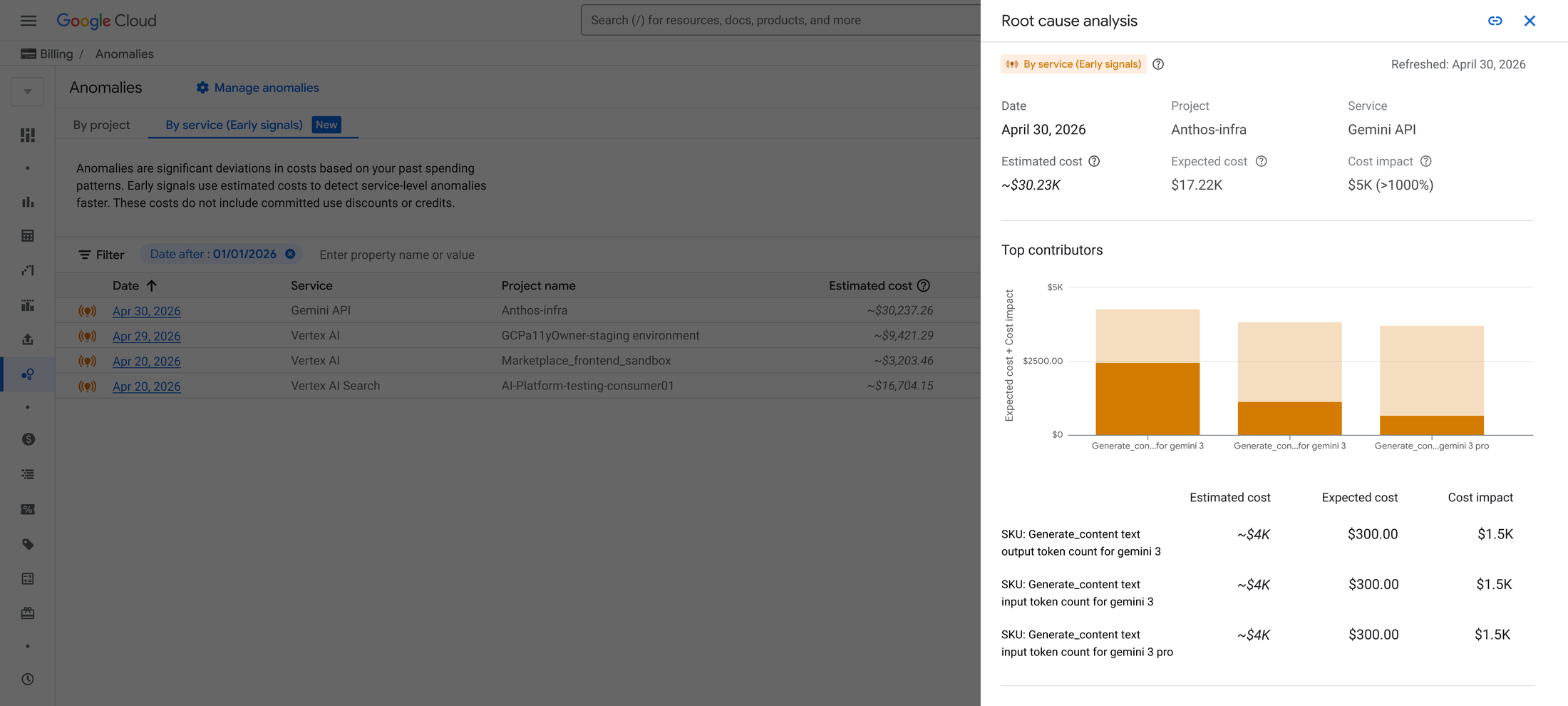
          • It tells you what caused it. When a daily cost trend looks abnormal, the system generates a root cause analysis identifying the top three SKUs behind the increase. That turns a two-hour investigation into a two-minute one.
          Cost anomaly root cause analysis in Google Cloud Billing

          The practical value is triage. Once you can see which services swing most unpredictably, you know exactly which ones need a hard limit.

          Spend caps actually stop the spending

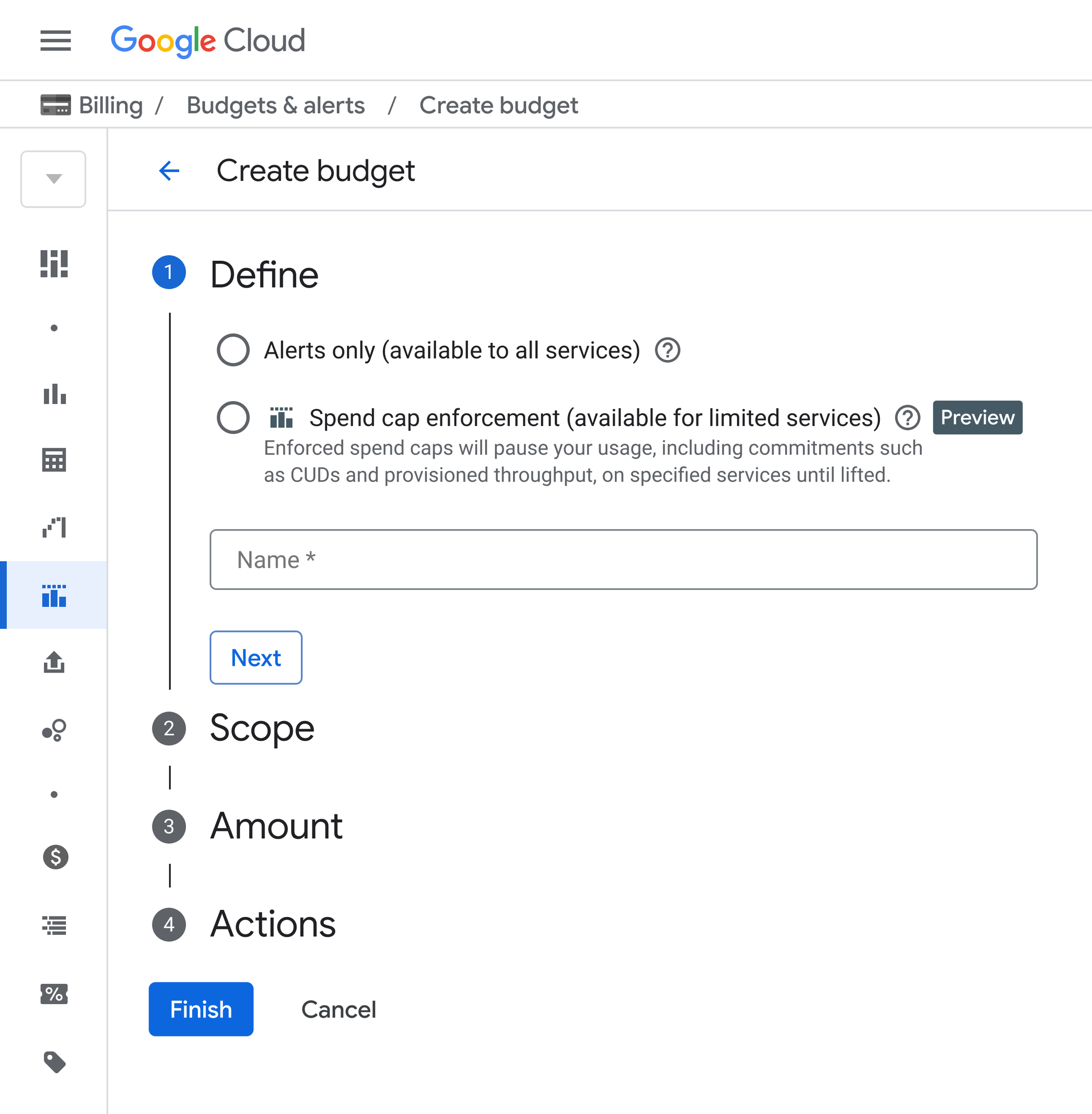
          Spend caps are the enforcement half. You set a monthly ceiling on a specific service within a specific project, and when accumulated spend hits that number, Google Cloud automatically restricts further cost-incurring usage for that service. Nothing else in your environment is affected.

          Four details matter if you are considering rolling this out:

          1. It is non-destructive. Your data and resources are untouched. Usage pauses, nothing is deleted.
          2. It escalates before it acts. Billing Administrators and Project Owners get automated email alerts at 50%, 80%, and 100% of budget.
          3. Recovery is one click. When a cap triggers, the block stays until someone manually lifts it in the Budgets UI. That is deliberate, and it is the right default.
          4. It fires fast. Because caps for AI services work off estimated rather than reconciled costs, enforcement happens within minutes of hitting the threshold rather than hours.
          Creating a budget with spend cap enforcement in Google Cloud Billing

          One important caveat: spend caps halt new on-demand charges, but fixed commitment fees such as Committed Use Discounts or Provisioned Throughput keep billing at their contractual rate. A cap protects you from runaway usage, not from a commitment you have already made.

          Both features are in public preview, currently supporting Gemini API, Agent Platform, Cloud Run, and Cloud Run Functions. During preview, a spend cap applies to a single project and service on a fixed monthly timeframe.

          Where to start: apply caps to your development and test environments first. That is where experimentation happens, where runaway jobs originate, and where a pause carries the least production risk.

          Strategy 2: Revisit your commitments under the new spend-based CUD model

          Committed Use Discounts remain one of the highest-leverage tools available for reducing Google Cloud costs. The problem was never the discount. It was that almost nobody could explain their own savings without a spreadsheet.

          Google has now moved spend-based CUDs from a credit-based system to a direct discounted price model, and the change is fully rolled out to all customers.

          The math got dramatically simpler

          Under the old model, working out what you actually saved required juggling three numbers: the full on-demand cost, the commitment fee, and an offsetting credit. You committed to an hourly on-demand amount, then reverse-engineered the net.

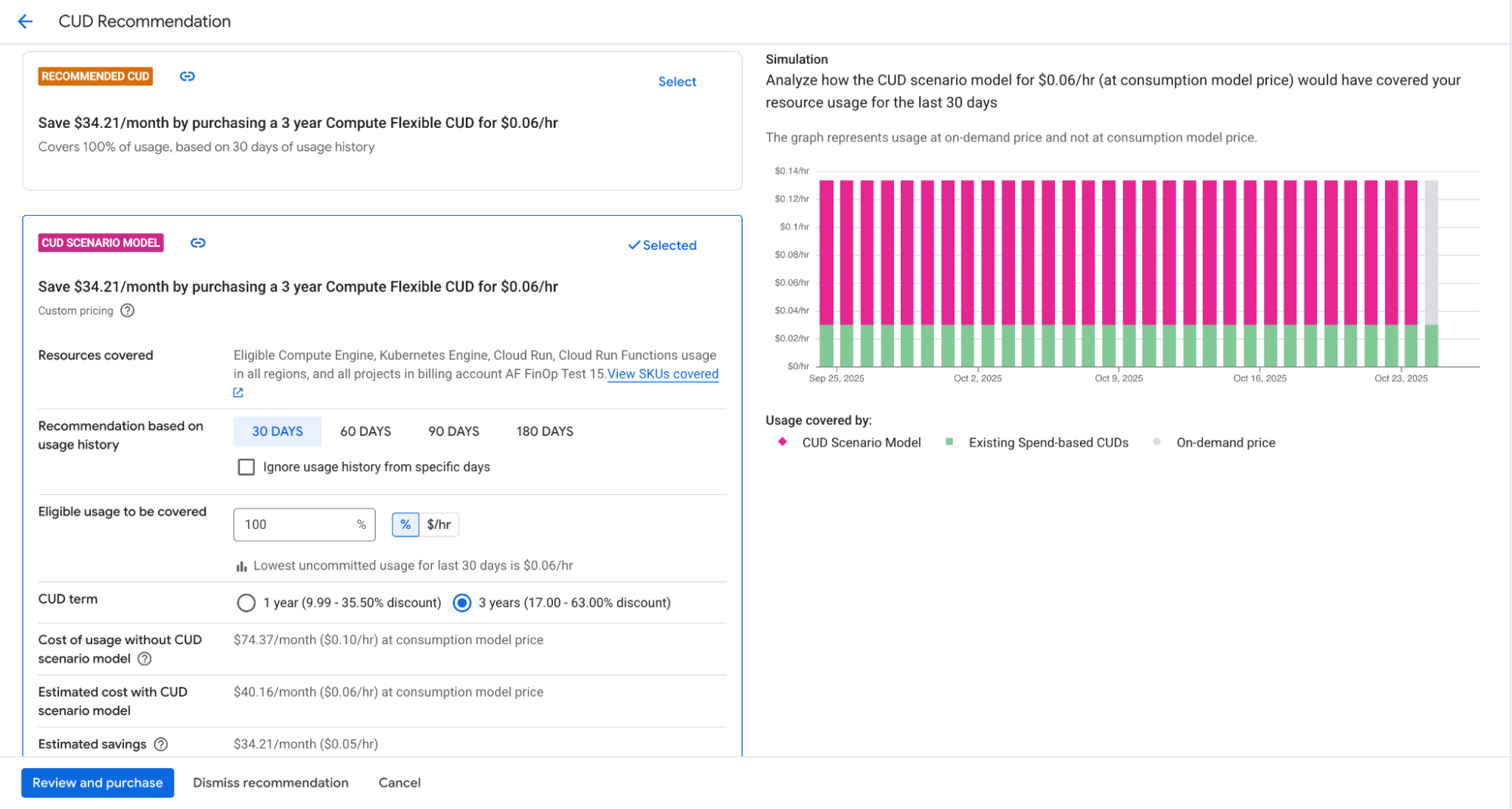
          Under the new model, you commit directly to the discounted spend amount and your usage is billed at that rate. Your net cost appears on the dashboard as a single figure. Savings is just the gap between the on-demand price and what you actually paid.

          Committed use discount recommendation in Google Cloud

          This sounds like a cosmetic change. It is not. Finance teams that could never confidently report cloud savings to leadership can now do it from a single view, which tends to unlock the budget conversation that was previously stuck.

          You can now audit your commitments properly

          The unified CUD Analysis tool gives you coverage and utilization visibility with hourly granularity for up to 30 days. That granularity matters more than it sounds. Daily averages routinely conceal underutilization that only shows up during specific hours, which means teams have been quietly overcommitting without any signal.

          If you want to work with the raw data, there is a spend-based CUD metadata export you can join against your Billing BigQuery Export datasets for programmatic analysis, or a straightforward CSV export from the CUD Analysis view if BigQuery is more than you need.

          Cost Reports now include a Savings Programs line that reflects true net savings rather than gross credit. If you are comparing figures from before and after the migration, include both usage SKUs and commitment fee SKUs so you capture the full picture.

          Sizing the commitment is less of a guess

          CUD recommendations now factor in data from GKE, Cloud Run, Cloud Run Functions, and Compute Engine, which makes Compute Flexible CUD suggestions considerably more accurate for teams running mixed workloads.

          Scenario modeling is the part worth exploring. You can adjust coverage thresholds, exclude dates with irregular usage that would otherwise skew the recommendation, and extend the lookback window up to 180 days. That lets you size a commitment against your actual risk tolerance rather than accepting a default.

          Coverage has also expanded to newer SKUs including Cloud Run and H3 and M-series VMs, and a longstanding reporting limitation affecting customers combining Flex CUDs with GKE or Cloud Run CUDs has been resolved.

          Where to start: if you purchased commitments before this migration, run a CUD Analysis comparison across the migration date. Confirm your savings held, then re-examine whether your coverage levels still match how your workloads have actually evolved.

          Strategy 3: Automate financial governance instead of chasing it

          The two strategies above address cost after it has been incurred. This one addresses the conditions that let waste accumulate in the first place.

          Every organization running Google Cloud at any real scale hits the same wall: untagged resources nobody can attribute, storage buckets with no lifecycle policy, BigQuery tables retaining data forever, environments that drift from whatever standard was agreed on eighteen months ago. Manual reviews take weeks. By the time an audit finishes, the environment has changed.

          Workload Manager lets you codify those policies and enforce them continuously.

          What you can automate

          Workload Manager validates your workloads against best practices using rules defined in Open Policy Agent (OPA) Rego. You can choose from hundreds of predefined rules authored by Google Cloud covering FinOps, reliability, security, and operations, or write your own.

          Cost policies worth automating early:

          • Requiring labels or tags on specific resource types so cost allocation and showback actually work
          • Enforcing lifecycle management or Autoclass configuration on every Cloud Storage bucket
          • Setting appropriate data retention on storage such as BigQuery tables
          • Disabling simultaneous multi-threading where it reduces licensing costs, for example on SQL Server
          FinOps rules table in Google Cloud Workload Manager

          Google also recently cut the cost of running Workload Manager by up to 95% for certain scenarios and added a free tier for smaller tests, which removes most of the reason to delay trying it.

          How the workflow fits together

          Setup follows four steps. You create an evaluation and select your rules, whether predefined, custom, or both. You define scope, which can be your entire organization, specific folders, individual projects, or filtered by resource label or name. You set a schedule ranging from hourly to monthly, configure notifications through email, Slack, or PagerDuty, and export results to a BigQuery dataset. Then the evaluation runs on schedule or on demand, storing a historical record of your compliance posture.

          For reporting, connect the BigQuery results to Looker Studio. There is a Google Cloud Workload Manager template in the Looker Studio template gallery that you can point at your own dataset and customize.

          The outcome is a shift in how cost governance operates. Instead of one person chasing teams for compliance, policy violations surface automatically to the people who can fix them, with a historical trend line showing whether things are improving.

          Where to start: pick a single policy with clear business value, usually mandatory labeling on your highest-spend resource type, and scope it to one folder. Prove the loop works before expanding it organization-wide.

          Workload Manager rule violations report in Looker Studio

          How these three strategies work together

          Treated separately, each of these is a useful feature. Treated as a system, they cover the full cost lifecycle:

          LayerToolWhat it does
          PreventWorkload Manager policiesStops misconfiguration and untracked resources from accumulating
          DetectEarly anomaliesFlags abnormal spend before it reaches the invoice
          EnforceSpend capsHalts runaway usage automatically
          OptimizeSpend-based CUDsReduces the rate you pay on committed baseline usage

          Most organizations we work with have one or two of these layers and assume they are covered. The gap is usually enforcement, which is exactly the layer that AI workloads punish hardest.

          Getting started

          If you are running meaningful workloads on Google Cloud, here is a reasonable sequence:

          1. Open the Anomalies section of your Billing console and review what early anomaly detection surfaces on your AI services.
          2. Apply spend caps to your development and test projects for the supported services.
          3. Run a CUD Analysis comparison across your migration date and validate that your savings carried over.
          4. Use CUD scenario modeling with a 180-day lookback to check whether your current coverage still fits your usage.
          5. Automate one high-value cost policy in Workload Manager, scoped narrowly, and expand from there.

          The tooling is genuinely better than it was a year ago. The harder part is usually not configuration, it is deciding what your policies should be and what level of commitment risk your business can carry.

          That is where a partner earns their place. As a Google Cloud Premier Partner, Premier Cloud works with organizations across North America to build cost governance that holds up under real workloads. If your cloud bill is growing faster than your usage, or if AI experimentation is outpacing your ability to track what it costs, we can help you get ahead of it.

          Frequently asked questions

          What is Google Cloud cost optimization? Google Cloud cost optimization is the practice of reducing cloud spend without compromising performance or availability. It combines visibility into where money is going, structural discounts such as Committed Use Discounts, right-sizing of resources, and governance policies that prevent waste from accumulating.

          How do Google Cloud spend caps work? Spend caps let you set a monthly spending ceiling on a specific service within a specific project. When accumulated spend reaches your defined cap, Google Cloud automatically restricts further cost-incurring usage for that service. The action is non-destructive, alerts fire at 50%, 80%, and 100% of budget, and the cap can be lifted with one click from the Budgets UI.

          What changed with spend-based Committed Use Discounts? Google Cloud moved spend-based CUDs from a credit-based system to a direct discounted price model. You now commit to a net discounted spend amount and your usage is billed at that rate, so your net cost is visible directly rather than requiring you to reconcile on-demand costs, commitment fees, and credits separately.

          Can you set spending limits on the Gemini API? Yes. During the current public preview, spend caps support Gemini API, Agent Platform, Cloud Run, and Cloud Run Functions, applied to a single project and service on a fixed monthly timeframe.

          How much can Committed Use Discounts save? Savings depend on your commitment term, coverage level, and workload profile. The CUD Analysis tool and scenario modeling in your Billing console give you a modeled figure based on your actual usage, with lookback windows configurable up to 180 days.

          Sources

          Related reading

          Read article
          5 New Updates to Google Workspace – July 2026 Edition

          5 New Updates to Google Workspace – July 2026 Edition

            Google Workspace is constantly evolving to make our workflows more seamless, productive, and integrated. In July 2026, several exciting changes were rolled out to help individuals and organizations get more done. Whether you’re organizing meetings, crunching numbers, or drafting documents, these new features will elevate your daily productivity.

            Here are 5 new updates to Google Workspace that you need to know about!

            1. Better Organization for Google Meet Files in Drive

            Say goodbye to digging around for meeting notes and video recordings! Google Meet is making it much easier to find your meeting artifacts in Google Drive.

            Following a meeting, all related files—including notes, transcripts, and recordings—are automatically uploaded to a dedicated “Google Meet” folder in the host’s My Drive. Inside that folder, files are neatly organized into specific subfolders for each individual meeting. Even better, any meeting attendees with access will now see shortcuts to these files directly in their own “Google Meet” Drive folders.
            Google Meet now organizes your meeting notes, transcripts, and recordings in your Google Drive - 7148

            2. Generate and Edit Visuals with Gemini in Google Docs

            Creating beautiful, context-aware visuals just got a whole lot easier. You can now use Gemini in Google Docs to generate and edit images, diagrams, and infographics right alongside your text!

            Because these AI generations leverage the context of your document, you can produce highly relevant visuals without ever leaving Docs or relying on third-party design tools. Plus, you can refine your existing graphics using simple natural language prompts (e.g., “Change the aspect ratio to 16:9” or “Make the style match the document”).

            Generate and edit visuals with Gemini in Google Docs - 6806

            3. A Centralized Hub for Meeting Resources on the Web

            Preparing for a meeting shouldn’t feel like a scavenger hunt. To help you stay organized, Google has revamped the Google Meet homepage on the web to act as a centralized hub for all your meeting resources.

            This new homepage provides a unified view of your upcoming agenda, meeting descriptions, and calendar attachments. It also makes it incredibly easy to follow through on past meetings by surfacing notes, recordings, and transcripts without having to navigate back to your inbox or calendar. Plus, new week and month navigators allow you to look ahead at your schedule seamlessly.

            A centralized hub for meeting resources on the new Google Meet homepage - 6698

            4. NotebookLM is Now “Gemini Notebook”

            Google’s premier AI-powered research tool, NotebookLM, is officially getting a new name: Gemini Notebook.

            While it remains a standalone product focused on being your personal AI research assistant, the rebranding reflects its evolution and growing integration across the broader Google ecosystem. Keep an eye out for the new name and updated logo rolling out across your interfaces soon!

            NotebookLM logo

            5. Import and Create Combo Charts in Google Sheets

            For data enthusiasts, Google Sheets has significantly enhanced its support for combo charts, making for a much smoother experience when creating multi-series visualizations.

            Users can now natively create new “Combo” chart types (like Clustered Column – Line, or Clustered Column – Line on a Secondary Axis) to visualize complex datasets with different scales and metrics without manual re-plotting workarounds. Additionally, Sheets has improved its Microsoft Excel import compatibility, ensuring that external files with combo charts and secondary axes retain their formatting perfectly when uploaded.

            Import and create combo charts in Google Sheets - 6843
            Read article
            A Beginner’s Guide to Google Antigravity

            A Beginner’s Guide to Google Antigravity

              The landscape of software development is rapidly shifting from manually writing code to orchestrating agentic systems that autonomously build, test, and deploy software. To navigate this shift, organizations need more than just AI-assisted coding tools; they need a governed, scalable platform. Enter Google Antigravity, an agent-first platform designed to power the next era of development and automation.

              This guide explores the value of Google Antigravity and how technical and non-technical decision-makers can leverage it within their enterprises.

              The Value of Google Antigravity

              For business leaders and enterprise architects, scaling AI presents challenges in security, cost predictability, and governance. Google Antigravity solves these bottlenecks by offering an end-to-end platform with several core benefits:

              • Unmatched Efficiency and Lower Costs: Antigravity is co-optimized for the Gemini 3 family of models, notably Gemini 3.5 Flash. This optimization allows the Antigravity agent harness to deliver results faster and with a much lower compute footprint, operating at one-third the cost of earlier models. Because it is highly token-efficient, teams can execute longer, complex workflows before hitting rate limits.
              • Enterprise-Grade Security and Data Privacy: When used via the Gemini Enterprise Agent Platform, Antigravity usage is governed by standard Google Cloud Terms of Service. This ensures your proprietary data remains within your secure cloud boundary and under your control, with no risk of Google training on your private customer data.
              • Predictable Cost Controls: Administrators maintain strict oversight. The platform allows admins to set project-level cost limits and budget alerts, ensuring AI initiatives scale without spiraling costs. You can also choose between standard Pay-As-You-Go models or Provisioned Throughput for critical traffic needing assured capacity.
              • Real-World Acceleration: Companies like PwC and Monks report that Antigravity fundamentally shifts their teams from simple code completion to high-level orchestration, eliminating traditional development friction and accelerating the delivery of custom client solutions.

              How Should You Use It?

              Google Antigravity meets developers where they are by providing two primary, seamlessly connected interfaces:

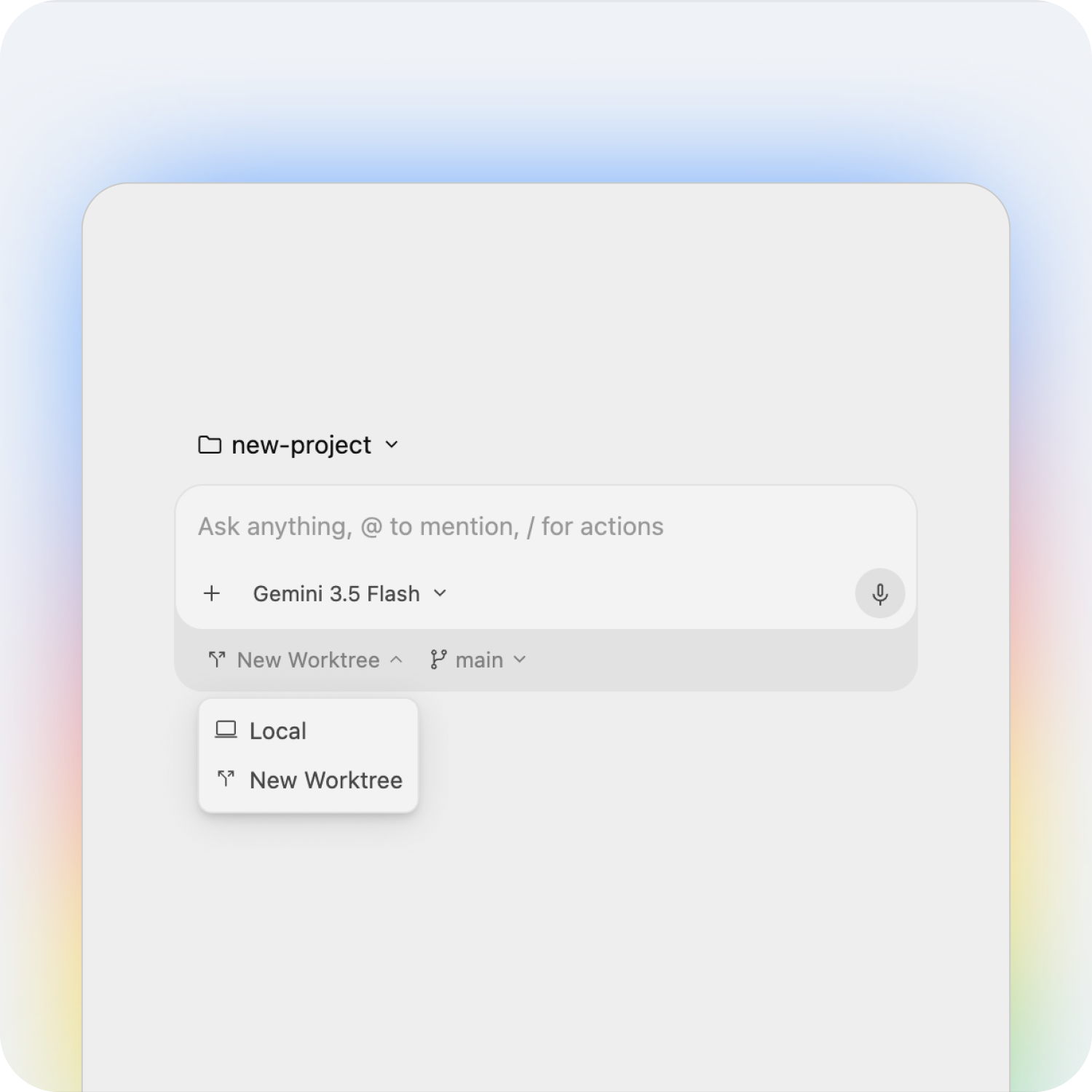
              1. Antigravity 2.0 (The Visual Orchestrator) This standalone desktop application is a dedicated mission control for builders and non-traditional developers.

              Antigravity new chat interface
              • Subagents: You can delegate complex workflows to focused subagents that work in parallel on specialized tasks.
              • Scheduled Tasks: Put agents on autopilot using cron schedules to execute routine tasks in the background.
              • Voice Commands: Describe what you need in plain language, powered by Gemini’s advanced audio understanding.

              2. Antigravity CLI (The Terminal Experience): For engineers who prefer the command line, the CLI brings the same powerful agent harness directly to their terminal.

              • High Velocity: It is optimized for maximum speed and lower overhead, allowing rapid building and testing of workflows.
              • Custom Slash Commands: You can define custom skills in your workspace that automatically register as native slash commands, turning team playbooks into executable actions.

              3. Antigravity IDE (The Fully Featured Environment) The Antigravity IDE is a fully featured, agentic development environment complete with an agent manager, custom artifacts, and a deep understanding of your codebase. It allows everyday engineers to instantly refactor legacy code and generate corresponding unit tests directly where they work.

              • Note: The IDE currently operates under the consumer Antigravity Terms of Service and is not yet supported via Google Cloud Terms of Service. Future IDE extensions and enterprise support will be made available via the Gemini Enterprise Agent Platform.

              4. Antigravity SDK (The Custom Agent Engine) The SDK provides programmatic access to the Antigravity harness, allowing developers to prototype custom agents with minimal code. Using simple Python scripts, you can define custom agent behaviors, run evaluations, and host applications on your own infrastructure.
              • Note: The SDK is initially targeted at researchers and is not currently available via the Gemini Enterprise Agent Platform.

              Empowering Every Role: Different parts of your engineering organization will use Antigravity to solve unique problems:

              • The Platform Engineer can use the CLI and Agent Registry to securely wrap internal scripts into governed agents, applying strict guardrails before they are discovered by the wider team.
              • The Agent Developer can build custom agents to autonomously handle complex multi-step pull request reviews, verifying links and suggesting code revisions.

              Real-World Enterprise Use Cases

              Google Antigravity is built to support distinct workflows across the entire engineering organization:

              • The Everyday Engineer can leverage Antigravity to instantly refactor legacy code and generate comprehensive unit tests right alongside their daily work.
              • The Agent Developer can construct custom agents to automate complex multi-step pull request reviews, reading code changes and suggesting revisions autonomously.
              • The Platform Engineer can securely wrap internal scripts into governed agents, ensuring strict guardrails are applied before they are discovered and used by the broader team.

              Global enterprises are already proving the value. Leaders from companies like PwC and Monks report that Antigravity has fundamentally shifted their teams from simple code completion to high-level orchestration, allowing them to run continuous engineering pipelines in the background, eliminate development friction, and deliver custom solutions at unprecedented speeds.

              • The Everyday Engineer: can leverage Antigravity to instantly refactor legacy code and generate comprehensive unit tests right alongside their daily work.
              • The Agent Developer: can construct custom agents to automate complex multi-step pull request reviews, reading code changes and suggesting revisions autonomously.
              • The Platform Engineer: can securely wrap internal scripts into governed agents, ensuring strict guardrails are applied before they are discovered and used by the broader team.

              Global enterprises are already proving the value. Leaders from companies like PwC and Monks report that Antigravity has fundamentally shifted their teams from simple code completion to high-level orchestration, allowing them to run continuous engineering pipelines in the background, eliminate development friction, and deliver custom solutions at unprecedented speeds.

              Rolling this out to a team? See our guide to Google Antigravity for Business.

              Step-by-Step Guide to Getting Started

              Adopting Google Antigravity is designed to be a quick and frictionless process for Cloud customers.

              For Google Cloud Admins:

              1. Activate the aiplatform.googleapis.com API within your Google Cloud project.
              2. Assign the necessary IAM roles to developers—specifically, the Agent Platform User role is required to access the system.
              3. Establish observability and set project-level budget alerts to maintain control over expenditures.

              For Enterprise Developers and Users:

              1. Download Google Antigravity and log in to the desktop application or CLI using your standard Cloud Identity OAuth credentials.
              2. Accept the Google Cloud Terms of Service and specify your Google Cloud project ID and location.
              3. Start running tasks. Your context, settings, and conversation history will seamlessly follow you whether you are orchestrating visually in Antigravity 2.0 or executing commands in the CLI.

              Related reading

              Read article
              Premier Cloud ranked 486th on CRN’s Solution Provider 500 list for 2026

              Premier Cloud ranked 486th on CRN’s Solution Provider 500 list for 2026

                VICTORIA, BC. June 9, 2026 — CRN has announced Premier Cloud in 486th place on the 2026 CRN Solution Provider 500 list.

                CRN’s annual Solution Provider 500 list ranks the top revenue-generating IT services firms in North America. This prestigious index highlights the major technology channel players driving global industry expansion and innovation.

                “The Solution Provider 500 list highlights those companies generating the highest revenue through leadership in business and service innovation,” said Jennifer Follett, Vice President, U.S. Content,  Executive Editor at CRN, The Channel Company. “This recognition highlights those organizations that consistently demonstrate agility and sustained growth amid rapidly evolving industry demands and technological change. Congratulations to every company that earned a well-deserved place on this year’s Solution Provider 500.”  

                As IT environments become more sophisticated and technologies such as AI continue to reshape how businesses operate, customers need trusted partners who bring both strategic guidance and hands-on technical expertise. Premier Cloud remains focused on helping organizations navigate this complexity with secure, scalable, and innovative cloud and AI solutions.

                Looking ahead, we remain focused on building innovative solutions on Google Cloud, fostering strategic partnerships, and delivering the high-impact results that define our clients’ success.

                Read article
                Premier Cloud Named in CRN’s 2026 Tech Elite 250 List

                Premier Cloud Named in CRN’s 2026 Tech Elite 250 List

                  Premier Cloud is proud to share that we have been named to CRN’s 2026 Tech Elite 250, an annual list recognizing solution providers across the U.S. and Canada that distinguish themselves through advanced technical certifications, specializations, and expertise from leading technology vendors.

                  The Tech Elite 250 highlights companies that demonstrate a strong commitment to excellence in areas such as artificial intelligence, infrastructure, cloud, and security. For Premier Cloud, this recognition reflects our continued investment in the skills, partnerships, and technical capabilities required to help organizations modernize, scale, and solve complex business challenges with confidence.

                  As IT environments become more sophisticated and technologies such as AI continue to reshape how businesses operate, customers need trusted partners who bring both strategic guidance and hands-on technical expertise. Premier Cloud remains focused on helping organizations navigate this complexity with secure, scalable, and innovative cloud solutions.

                  Being included on CRN’s Tech Elite 250 is a meaningful acknowledgment of the work our team does every day to deliver high-impact outcomes for customers. It also reinforces our commitment to maintaining the certifications, training, and vendor specializations that enable us to provide expert support across today’s evolving technology landscape.

                  Read article
                  What’s New in Gemini Enterprise and Why It Matters for Your Business

                  What’s New in Gemini Enterprise and Why It Matters for Your Business

                    The world of artificial intelligence is moving fast. Not long ago, we were impressed by AI that could answer questions. Now, we’re on the cusp of a new era where AI can do things for us. This is the shift from AI as an information tool to AI as a teammate. And at the forefront of this transformation is the new Gemini Enterprise.

                    If you’re wondering what this means for your business, you’ve come to the right place. In this post, we’ll break down what’s new in Gemini Enterprise and, more importantly, why you should care.


                    One Platform, Two Powerhouses: Agent Platform and the Gemini App

                    At its core, the new Gemini Enterprise is an end-to-end system designed for this new “agentic” era of AI. It’s composed of two main parts:

                    • Gemini Enterprise Agent Platform: Think of this as the engine room. It’s the evolution of Vertex AI, providing a comprehensive environment for developers to build, scale, govern, and optimize AI agents.
                    • Gemini Enterprise app: This is the bridge between the powerful AI agents and your team. It’s a single, secure place where employees can discover, create, and use AI agents to get work done.

                    Together, these two components create a unified system that allows your business to harness the power of AI agents in a secure and scalable way.


                    Build, Scale, and Govern: A New Era of AI Development

                    One of the biggest challenges with AI has been moving from exciting demos to real-world business applications that are secure and reliable. Gemini Enterprise addresses this head-on with a suite of new capabilities:

                    For the Builders: Tools for Every Skill Level

                    Whether you have a team of expert AI developers or want to empower your business users to create their own solutions, Gemini Enterprise has you covered.

                    • Agent Development Kit (ADK): For your technical teams, the enhanced ADK provides a powerful, code-first environment to build sophisticated, multi-agent systems.
                    • Agent Studio: For those who prefer a more visual approach, Agent Studio offers a low-code interface to build and deploy agents quickly.

                    This flexibility means you can get from idea to production in hours, not months, and unlock the creativity of your entire team.

                    For the Strategists: Scaling with Confidence

                    Building an agent is one thing; deploying and managing a fleet of them is another. Gemini Enterprise provides the infrastructure to do just that.

                    • Agent Runtime: This allows for long-running agents that can work autonomously for days on complex, multi-step tasks.
                    • Memory Bank: This gives agents long-term memory, allowing them to remember user preferences and past interactions for more personalized and effective assistance.

                    These features enable you to move beyond simple, one-off tasks and start automating entire business processes, like sales prospecting or financial reconciliation.

                    For the Guardians: Security and Governance by Design

                    As AI becomes more integrated into your business, security and governance become paramount. Gemini Enterprise is built with this in mind, offering a range of features to give you peace of mind.

                    • Agent Identity: Every agent is assigned a unique, verifiable identity, creating a clear audit trail for every action.
                    • Agent Registry: This provides a central library of approved agents and tools, so you know your team is using trusted, vetted resources.
                    • Agent Gateway: This acts as a central control point, enforcing security policies and preventing data leakage.

                    With these features, you can embrace the power of AI without sacrificing control or security.


                    The Bottom Line: What This Means for Your Business

                    So, what does all this new technology mean for your bottom line? Here are a few of the business outcomes you can expect:

                    • Increased Productivity: By automating complex, multi-step processes, you can free up your team to focus on more strategic, high-value work.
                    • Faster Innovation: With tools that make it easier to build and deploy AI solutions, you can bring new products and services to market faster.
                    • Improved Decision-Making: By giving your team access to AI-powered insights, you can make faster, more data-driven decisions.
                    • Enhanced Customer Experience: By using AI agents to provide more personalized and efficient service, you can improve customer satisfaction and loyalty.

                    The new Gemini Enterprise is more than just a new set of tools; it’s a new way of working. It’s about empowering your entire organization to leverage the power of AI to drive real business results. The age of the AI agent is here, and with Gemini Enterprise, your business can be ready for it.

                    Related reading

                    Read article
                    Welcome to the Agentic Era: Google Cloud Next 2026 Recap

                    Welcome to the Agentic Era: Google Cloud Next 2026 Recap

                      Welcome to the Agentic Era. For organizations already deeply invested in Google Cloud Platform and Google Workspace, the experimental phase of artificial intelligence is firmly in the rearview mirror. At Google Cloud Next 2026 in Las Vegas, the narrative officially shifted from isolated generative AI chatbots to fully integrated, semi-autonomous “agentic systems” capable of running entire workflows.

                      For technology leaders whose primary concerns are establishing ironclad security, optimizing cloud costs (FinOps), and streamlining complex cloud migrations, Next ’26 delivered a cohesive, highly actionable blueprint. Google is no longer just offering tools; it is providing the end-to-end connective tissue needed to deploy a digital taskforce securely and at scale. Here is a comprehensive deep dive into the most critical announcements across Gemini Enterprise, Google Workspace, and Google Cloud Security.

                      Gemini Enterprise: The Engine for Agentic Operations

                      Google is unifying its AI portfolio to help enterprises transition from simply answering prompts to delegating full business outcomes. Gemini Enterprise provides a single environment for teams to build, scale, govern, and optimize their AI agents.

                      Gemini Enterprise Agent Platform overview

                      Gemini Enterprise Agent Platform: Representing the evolution of Vertex AI, the Gemini Enterprise Agent Platform is the comprehensive foundation for technical teams. It combines the model selection and building capabilities that developers already rely on with powerful new features for orchestration, security, and DevOps. To directly address the growing need for strict FinOps and cost optimization, Google also introduced proactive cost anomalies detection. A new, dedicated FinOps agent autonomously analyzes spending spikes across your environment and generates highly granular cost reports on demand, ensuring your AI scaling doesn’t lead to unexpected budget overruns.

                      Gemini Enterprise App: For the everyday workforce, the Gemini Enterprise App serves as the new collaborative “front door” to AI. It is designed to empower non-technical employees to build and manage their own digital assistants.

                      • Agent Designer: This no-code visual builder allows business users to create sophisticated, multi-system workflows using simple natural language. Employees can now build agents that trigger automatically based on specific events or run on a set schedule without writing a single line of code.
                      • Inbox in Gemini Enterprise: As employees deploy more long-running agents to handle tasks like financial reconciliation or sales sequencing, they need a way to track them. The new Inbox acts as a unified hub to monitor active workflows, adjust configurations, and receive real-time status alerts, ensuring automated processes always stay on track.
                      • Projects: To solve the problem of context loss, Projects creates a persistent, data-grounded knowledge base for your team. It serves as a secure “shared brain” that grounds the AI strictly in explicitly added files and conversations. This ensures that critical project intelligence remains a permanent company asset, providing true operational continuity even as team members change roles.

                      Gemini Enterprise for Customer Experience (CX) Designed to seamlessly unify the shopping and service journey, this suite ensures a frictionless customer experience from product discovery to post-sale support.

                      • CX Agent Studio: A low-code visual builder that allows teams to design empathetic, highly multimodal agents grounded entirely in your enterprise data.
                      • Omnichannel Gateway: This guarantees that a customer’s context travels flawlessly across web, mobile, voice, and social channels without any lag or repetition. The return on investment here is already proven; for example, Best Buy utilized these tools to increase their customer self-service rates by a staggering 200% by having agents engage in precise, long-format troubleshooting.

                      Google Workspace: Reimagining Enterprise Productivity

                      For the billions of users relying on Google Workspace, AI is transforming the suite from a collection of static applications into a dynamic, interconnected ecosystem.

                      Workspace Intelligence in Gemini

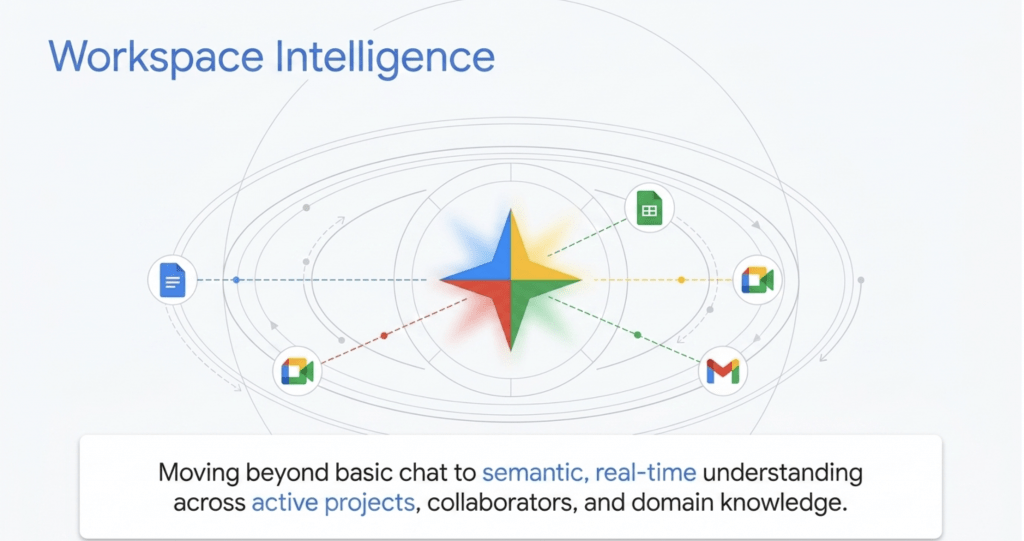
                      Workspace Intelligence: The cornerstone of this transformation is Workspace Intelligence, a new, unified semantic layer. Instead of forcing users to manually copy and paste context into every single prompt, Workspace Intelligence inherently understands the complex relationships within your specific work ecosystem. It securely maps your active projects, your frequent collaborators, and the domain knowledge living across Docs, Slides, and Gmail. This allows the AI to do the heavy lifting of gathering context across silos, safely providing personalized, highly relevant outputs.

                      New AI Features in Google Workspace

                      • Ask Gemini in Google Chat: Your Chat window is now a unified command line for all of your work. It provides a daily briefing that surfaces important tasks and unread threads. Crucially, with expanded third-party connectors (like Asana, Jira, and Salesforce), Ask Gemini bridges the gap between your Workspace content and external tools, allowing you to find information across your entire tech stack without leaving the conversation.
                      • Docs: Gemini can now automatically generate infographics, edit multiple images simultaneously, and automatically triage or edit documents based on user comments.
                      • Slides: You can now generate full, editable presentation decks in one shot, with the AI strictly adhering to your company’s official templates and styles.
                      • Sheets: A new Interactive Canvas allows you to use natural language to build interactive mini-apps—like kanban boards and custom dashboards—directly on top of your live data.
                      • Drive: Drive Insights and Projects centrally organize files to give Gemini full context, allowing you to instantly extract insights across your entire drive using AI Overviews.
                      • Vids: You can now quickly convert presentations into videos featuring highly realistic, fully branded AI avatars, complete with custom company logos and backdrops.
                      • Workspace MCP Server: Currently in public preview, the Workspace Model Context Protocol (MCP) Server allows developers to safely bring advanced Workspace capabilities—like synthesizing Drive documents or drafting Gmail responses—directly into their own custom AI applications and agents using a secure, open framework.
                      • Rapid Enterprise Migration: For organizations looking to move away from legacy tools, migrating your entire organization from Microsoft 365 to Google Workspace is now up to five times faster. This is powered by a new cloud-based data import service built directly into the admin console. To ensure there is no friction when collaborating with external partners still using Office, Google has also added improved interoperability features like an AI-powered Office macro converter, native Office file editing in Gmail, and redlining in Docs.

                      Agentic Defense: Securing the Autonomous Frontier

                      Agentic Defense security announcement from Google Cloud Next 26

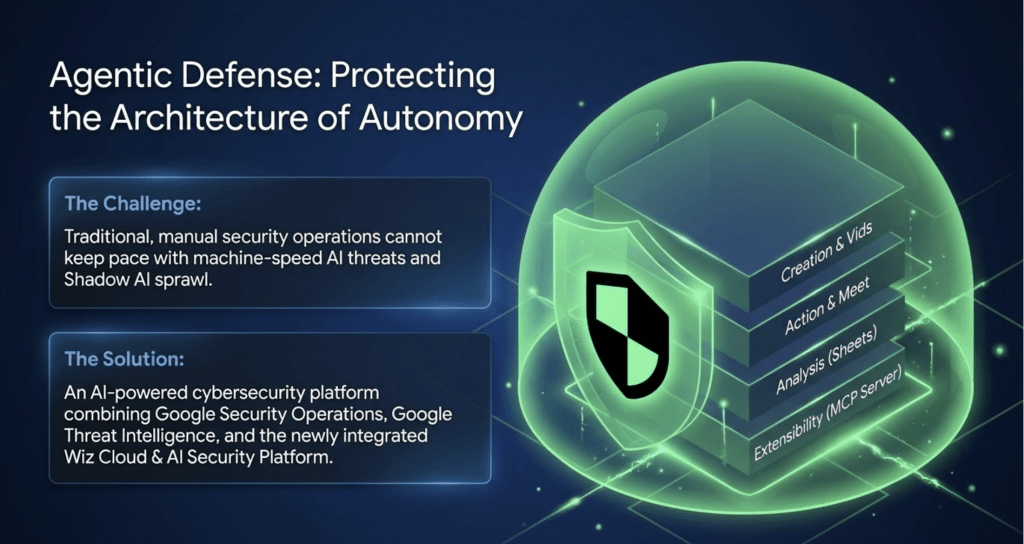
                      As AI accelerates business operations, it simultaneously accelerates the speed of malicious actors. At Next ’26, Google revealed that adversaries have reduced the time it takes to move from initial access to a threat hand-off from eight hours down to a terrifying 22 seconds. To combat this, human defenders require AI that operates at machine speed.

                      Wiz AI-Application Protection Following its deep integration into the Google Cloud ecosystem, Wiz introduced a comprehensive suite to secure the entire AI development lifecycle. A standout capability is the AI-Bill of Materials (AI-BOM). This dynamic tool automatically inventories all AI frameworks, language models, and IDE extensions across your multicloud environment. It provides absolute visibility into what is writing code in your stack, tracking sanctioned tools while aggressively uncovering and flagging unapproved “shadow AI” plugins. Furthermore, Wiz now offers inline security scanning that natively protects vibe-coded applications, surfacing vulnerabilities before they ever reach production.

                      Securing Agents and the Agentic Web: To ensure that autonomous agents operate within strict, governed boundaries, Google introduced several foundational security layers. Agent Identity provides every digital worker with a unique cryptographic identity, allowing for precise, scoped human delegation and access management. Agent Gateway acts as a centralized air-traffic controller, enforcing strict security policies across all agent-to-agent and agent-to-tool communications. Finally, Model Armor integrates directly with Agent Gateway to provide robust runtime protection against emerging threats like prompt injections and sensitive data leakage.

                      Agentic Threat Intelligence: To shift security from reactive to proactive, Google Security Operations introduced three new specialized, autonomous defenders.

                      Google Cloud Fraud Defense: As commerce becomes increasingly automated, identifying who—or what—is interacting with your systems is paramount. In a major evolution of reCAPTCHA, Google launched Fraud Defense. This unified trust platform is explicitly engineered for the agentic web, capable of discerning the subtle differences between human users, malicious botnets, and authorized, helpful AI agents, effectively securing the digital journey from registration through to final payment.

                      The Agentic Data Cloud: Fueling Autonomous Action

                      Agentic Data Cloud announcement from Google Cloud Next 26

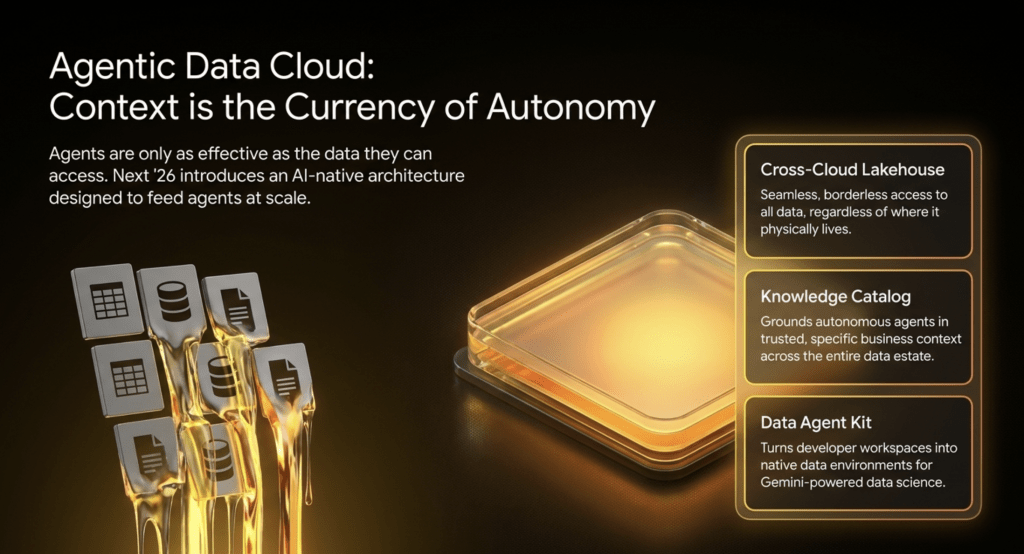
                      In the agentic era, an AI agent is only as smart as the data it understands. Google’s Agentic Data Cloud unifies your operational databases, analytical lakehouses, and AI models so your digital taskforce is grounded in absolute enterprise truth—without causing cloud costs to spiral.

                      Here are the core upgrades:

                      • Knowledge Catalog (Governance): This replaces static data dictionaries with a dynamic, universal context engine. It autonomously maps your business logic and permissions without moving a single byte of data, ensuring agents execute tasks accurately based on your company’s unique lingo.
                      • Cross-Cloud Lakehouse (Migration): Standardized on open Apache Iceberg, this allows you to instantly query data across Google Cloud, AWS, and Azure. It provides zero-copy, zero-ETL access, completely eliminating the latency and massive egress fees normally associated with cross-cloud data.
                      • BigQuery Fluid Scaling (FinOps): Built for unpredictable agentic workloads, BigQuery now adapts dynamically with true per-second billing and zero minimums. This structural change delivers up to 34% in immediate cost savings for enterprise FinOps teams.
                      • The Data Agent Kit: This shifts data engineering teams away from writing manual pipelines and toward agent orchestration. It turns any developer workspace into a native data environment to autonomously generate production-ready code.
                      • Conversational BI with Looker: Looker introduces Dashboard Agents that allow everyday users to ask natural language questions directly within their dashboards, delivering answers that are strictly governed by your enterprise semantic layer.
                      • AlloyDB AI at Massive Scale: To support the performance demands of enterprise AI, AlloyDB AI now scales to support over 10 billion vectors. It can process 100,000 rows per second for less than a tenth of a cent, bringing unprecedented cost-efficiency to operational databases.

                      Conclusion

                      Google Cloud Next 2026 proved that the infrastructure, intelligence, and security layers required for enterprise-grade AI are now fully integrated. By combining the unified context of Workspace Intelligence, the orchestration power of the Gemini Enterprise Agent Platform, and the machine-speed protection of Agentic Defense, Google Cloud has provided mature organizations with the exact tools they need to safely modernize their legacy systems, optimize their FinOps, and unleash the true ROI of artificial intelligence.

                      Related reading

                      Read article
                      Why list your solution on Google Cloud Marketplace? A practical guide for product and go-to market-leaders

                      Why list your solution on Google Cloud Marketplace? A practical guide for product and go-to market-leaders

                        Google Cloud Marketplace is more than a storefront. It is a procurement channel that helps buyers discover, evaluate, and purchase software with predictable billing and enterprise-grade procurement mechanics. For sellers, it can shorten buying cycles, increase deal size, and unlock co-selling opportunities inside the Google Cloud ecosystem.

                        What makes Marketplace high value

                        Marketplace simplifies procurement for enterprise buyers by connecting solutions to existing Google Cloud contracts and billing. That makes purchases easier and payments more predictable. Independent research shows that Marketplace often leads to longer, larger agreements for ISVs and partners while reducing procurement friction.

                        The practical pieces every listing must get right

                        A successful listing is a mix of technical, commercial, and operational readiness. Key requirements include validated architecture and security, a defined pricing and packaging model, seamless ordering and billing workflows, and end-to-end testing to meet Google standards. Failing any of these areas causes delays or rework during Google reviews.

                        A concise Marketplace launch checklist

                        1. Business readiness. Enroll in the Partner Advantage program, sign vendor agreements, and configure the payment profile and linked billing account.
                        2. Technical integration. Enable Marketplace APIs, publish an architecture diagram, deploy a registration page and an order processing application, and implement usage reporting when needed.
                        3. Pricing and packaging. Decide between subscriptions, usage-based models, or private offers, and document the billing flow.
                        4. Test and validate. Perform test purchases and end-to-end acceptance tests with Google to confirm fulfillment and billing behave as expected.
                        5. Launch and enablement. Publish the listing, support initial transactions, and coordinate go-to-market and co-selling motions.

                        How to reduce time to revenue

                        Because Marketplace is both technical and commercial, many teams benefit from a repeatable integration play. Native Marketplace workflows remove ongoing fulfillment overhead. Structured programs that combine architecture validation, order processing, testing, and GTM alignment make launches predictable and faster. Premier Cloud documents a multi-phase lifecycle that covers readiness, validation, integration, testing, and launch while providing hands-on engineering support for APIs, order processing, and test purchases.

                        Premier Cloud also offers packaged professional services to accelerate onboarding and preserve engineering capacity. This makes it easier for product teams to focus on product while Marketplace specialists handle the integration and approval process.

                        Bottom line

                        Google Cloud Marketplace can be a high impact GTM channel when technical, commercial, and operational steps are coordinated. Use a clear checklist and consider a partner that knows the Marketplace lifecycle to reduce rework and get to transactions faster. If you want a practical plan to list your solution and manage fulfillment, Premier Cloud can help you move through readiness, integration, and launch.

                        Read article
                        Gemini Enterprise FAQ: Key Questions Businesses Ask Before Adopting It

                        Gemini Enterprise FAQ: Key Questions Businesses Ask Before Adopting It

                          AI is everywhere right now, but most leaders are no longer asking whether it can write a paragraph. They are asking whether AI can safely support real work, connect to business systems, respect permissions, and meet compliance requirements.

                          Gemini Enterprise is Google Cloud’s agentic AI platform built for that exact reality. Below are the five questions businesses keep asking, along with clear, practical answers.


                          1) What is Gemini Enterprise?

                          Gemini Enterprise is a secure, enterprise-focused AI platform designed to help employees search, analyze, synthesize, and automate workflows using Google’s Gemini models and agent technology. In October 2025, Google Agentspace became part of Gemini Enterprise, meaning the conversational AI and agent orchestration capabilities behind Agentspace now power core Gemini Enterprise functionality.

                          Rather than existing as a standalone chat tool, Gemini Enterprise is positioned as an agentic layer across the business. Employees can investigate topics, summarize internal knowledge, and coordinate complex tasks using AI agents designed for enterprise workflows.

                          2) How is Gemini Enterprise different from the Gemini app?

                          This is one of the most common points of confusion.

                          The Gemini app is built for general public use. Gemini Enterprise is built specifically for business and enterprise environments. It is designed to address challenges such as fragmented organizational data, cross-functional collaboration, and stricter security, privacy, and compliance requirements.

                          In practice, Gemini Enterprise is meant to be the work version of Gemini. It connects to company systems and operates under enterprise governance rather than functioning as a consumer chatbot used at work.

                          3) Who owns the data, and is any of it used to train models?

                          For many organizations, this is the deciding question.

                          With Gemini Enterprise Business, Standard, and Plus editions, customers retain full ownership of their data. Prompts, responses, and training data are not used to train Google models or models for other customers. Google does not sell customer data or use it for advertising.

                          There is one important distinction. The Starter edition, which is an optional no-cost experience following the Gemini Business trial, may use data for product improvements and to train Google machine learning technologies. Customers can opt out of this behavior at any time through settings.

                          4) What security and compliance controls does Gemini Enterprise support?

                          Gemini Enterprise is designed for organizations that require governance and control.

                          The platform supports enterprise-grade capabilities such as identity and access management, document-level permissions, audit logging, and customer-managed encryption keys. Certain editions also support data residency, allowing organizations to keep data within specific geographic regions. Gemini Enterprise aligns with major compliance standards such as HIPAA and FedRAMP.

                          In addition, Gemini Enterprise includes built-in guardrails that screen AI prompts and responses for unsafe or malicious activity, including prompt injection and sensitive data exposure.

                          5) What can employees actually do with Gemini Enterprise?

                          Gemini Enterprise focuses on delivering value through both pre-built agents and customization.

                          Out of the box, it includes Google-built agents designed for tasks like deep research, secure information synthesis, and AI-assisted software development. These agents help teams move faster without requiring custom setup.

                          For organizations with more advanced needs, Gemini Enterprise allows teams to build and deploy their own agents or integrate existing ones. The platform also connects to common enterprise tools, including Google Workspace, Microsoft applications, and platforms such as Jira, Confluence, and ServiceNow. These connectors allow AI to work with business data while still enforcing existing access controls.


                          The bottom line

                          Gemini Enterprise is designed for organizations that want AI to move beyond experimentation and into everyday execution. By combining advanced AI reasoning with enterprise connectivity, strong security controls, and flexible agent capabilities, it provides a foundation for using AI responsibly inside real business workflows.

                          Learn about what Premier Cloud has to offer around Gemini Enterprise.

                          Related reading

                          Read article
                          What’s New to Google Workspace Series: 3 Practical Updates to Know About

                          What’s New to Google Workspace Series: 3 Practical Updates to Know About

                            Google Workspace continues to roll out features that make everyday work a little easier. Here are three recent updates that offer practical improvements for communication, compliance, and file organization.

                            1. Call Queuing for Google Voice

                            Configuring call handling for a Google Voice ring group

                            Google Voice now supports call queuing for ring groups in the Standard and Premier editions. Incoming callers are placed in a queue instead of being sent to voicemail or disconnected. This helps teams handle high call volumes and reduce missed opportunities.
                            Admins can set options like maximum wait time, queue size, and wrap-up time, making it easier for support and sales teams to stay responsive.


                            2. Automated Compliance Recording for Google Meet

                            Google Meet video call with a compliance notice

                            Organizations in regulated industries can now use automated compliance recording in Google Meet. When a regulated user joins a meeting, the call is recorded and a transcript is saved automatically.
                            Recording data is stored in a secure write-once, read-many Cloud Storage bucket to meet regulatory requirements in industries such as finance and healthcare. Participants will see a Compliance badge when this feature is active. This provides seamless compliance without disrupting the meeting experience.


                            3. Smart Folder Insights in Gemini for Google Drive

                            Get quick insights on your Google Drive folders with Gemini

                            Gemini in Google Drive now shows instant folder insights right at the top of a folder. You can see a quick summary of what is inside, including document types, key themes, and recent updates.
                            You can also select Explore with Gemini to get a deeper summary or ask questions about the folder contents. This helps users save time and stay organized, especially when working with large collections of files across multiple projects.


                            Why These Updates Matter

                            • Improved responsiveness with smarter call handling
                            • Stronger compliance support for regulated industries
                            • Faster information discovery with AI powered folder insights

                            These updates help teams work more efficiently, stay compliant, and find information faster. If your organization needs in enabling and making the most of these features in your organization, contact us here.

                            Read article
                            Lee Henwood has been named a CRN 2025 Next-Gen Solution Provider

                            Lee Henwood has been named a CRN 2025 Next-Gen Solution Provider

                              We’re excited to announce that Lee Henwood, Premier Cloud’s Senior Sales Manager, has been recognized in CRN’s 2025 Next-Gen Solution Provider Profiles. This annual program highlights rising leaders across the IT channel who are already driving significant impact, and Lee’s work within our organization has been a major contributor to Premier Cloud’s continued growth.

                              Strengthening Our Sales Organization

                              In Lee’s role as Senior Sales Manager, they support Premier Cloud’s sales teams by providing strategic guidance, coaching, and day-to-day leadership that elevates performance across the board. Lee has been instrumental in refining our sales processes, improving operational efficiency, and ensuring our teams stay aligned with evolving customer needs in a rapidly shifting technology landscape.

                              Lee’s leadership has helped our teams better articulate the value of emerging cloud and AI solutions, strengthening our ability to deliver modern, scalable technologies to organizations of all sizes.

                              Driving Momentum in Cloud & AI Solutions

                              A major area of Premier Cloud’s growth has come from supporting customers adopting Gemini Enterprise, Google’s advanced generative AI suite. Lee has played a key role in preparing our sales team to guide clients through these capabilities, helping them understand how Gemini Enterprise enhances productivity, supports decision-making, and integrates seamlessly into existing workflows.

                              In addition, Lee continues to champion expanded use of Google Workspace and broader cloud solutions, ensuring our customers receive expert guidance on tools that improve collaboration, streamline operations, and harness AI-driven features.

                              A Well-Earned Recognition

                              Lee’s inclusion in CRN’s 2025 Next-Gen Solution Provider Profiles is a testament to his leadership, dedication, and forward-looking mindset that help drive our success. Join us in celebrating this achievement as we continue empowering our clients and shaping the future of cloud innovation.

                              Read article
                              Premier Cloud Celebrates Team Recognition in the 2025 Google Cloud Partner All-Stars

                              Premier Cloud Celebrates Team Recognition in the 2025 Google Cloud Partner All-Stars

                                Premier Cloud is excited to announce that three members of our team have been recognized in the 2025 Google Cloud Partner All-Stars program. This year’s honourees include Hirad Hajilou, Colin Jacques, and Alex Shahbazfar, each acknowledged for their outstanding contributions across Google Cloud’s sales and marketing categories.

                                The Partner All-Stars program highlights top-performing individuals from across the global Google Cloud partner ecosystem. Each year, Google Cloud evaluates thousands of partner professionals and selects those who demonstrate exceptional achievements, impactful customer work and proven dedication to helping organizations succeed with Google Cloud technologies. The program recognizes talent across several key areas, celebrating those who consistently set a higher standard in their discipline.

                                This recognition reflects the skill, dedication, and customer-first mindset that Hirad, Colin, and Alex bring to Premier Cloud. Their achievements represent the impact our team strives to deliver every day, helping clients modernize, innovate, and grow with Google Cloud.

                                We look forward to continuing this momentum and supporting our customers with the same level of excellence recognized by the Google Cloud Partner All-Stars program.

                                Read article
                                Gemini Enterprise: How is it Different from Gemini in Workspace and NotebookLM?

                                Gemini Enterprise: How is it Different from Gemini in Workspace and NotebookLM?

                                  As organizations adopt generative AI, it’s common to encounter different tools that, at first glance, seem to overlap. A frequent question is how to distinguish between the AI features inside Google Workspace, the specialized tool NotebookLM, and the comprehensive platform, Gemini Enterprise. Each product is designed for a different purpose and operates at a different scale. Here is a clear breakdown of what each tool does.

                                  1. Gemini in Google Workspace

                                  This refers to the AI capabilities integrated directly into the Workspace applications you already use, such as Gmail, Docs, Sheets, and Meet.

                                  • Primary Goal: To assist with tasks within a specific application.
                                  • How it Works: It operates on the content you are currently working on. For example, it can help you draft or summarize an email in Gmail, write a blog post in Docs, create a project plan in Sheets, or generate images for a presentation in Slides.
                                  • Typical Use Case: You’re in a Google Doc and you ask Gemini to “help me write an outline for a marketing plan.” You are working on a single task within a single document.
                                  • Scope: Limited to the application you are in and the content it contains.

                                  2. NotebookLM (and NotebookLM Enterprise)

                                  NotebookLM is a standalone, AI-powered research and writing assistant.

                                  • Primary Goal: To help you understand, analyze, and synthesize information from a specific set of documents you provide.
                                  • How it Works: You upload your curated sources (like PDFs, Google Docs, website URLs, etc.) into a “notebook”. NotebookLM becomes an expert only on that information. You can ask it questions, and it will provide answers strictly confined to those sources, complete with citations.
                                  • Typical Use Case: A researcher uploads 20 clinical studies into a notebook and asks, “What are the common conclusions from these studies regarding treatment X?” It’s ideal for deep analysis of a known set of materials.
                                  • Scope: Limited to the specific, user-provided sources within a given notebook. The Enterprise version adds crucial security, compliance, and admin controls for business use.

                                  3. Gemini Enterprise

                                  Gemini Enterprise is a broad, advanced agentic platform that functions as a “new front door for AI in the workplace”. It operates at the scale of the entire organization.

                                  • Primary Goal: Enterprise-wide information discovery, multi-modal content generation, and—most importantly—the automation of complex, multi-step workflows.
                                  • How it Works:
                                    • Connects to All Data: It securely connects to data across your entire organization, not just Google Workspace. This includes third-party applications like Microsoft 365, Salesforce, SAP, and databases.
                                    • Builds AI Agents: It allows any user (not just developers) to use no-code tools to build custom “AI agents” that can orchestrate tasks across these different systems.
                                    • Includes Other Tools: The Gemini Enterprise platform also includes NotebookLM Enterprise as one of its pre-built agents.
                                  • Typical Use Case: A finance manager uses the no-code workbench to build an agent that automatically: 1) pulls sales data from Salesforce, 2) cross-references it with expense reports from SAP, 3) analyzes the profit margin, and 4) generates a summary report every Friday.
                                  • Scope: Enterprise-wide. It’s designed to automate processes and find answers from all connected company data sources.

                                  Comparison at a Glance

                                  Comparison of Gemini in Workspace, NotebookLM Enterprise and Gemini Enterprise

                                  How Premier Cloud can help

                                  Understanding these distinctions is the first step. As a Google Premier Partner, Premier Cloud helps you move from theory to practice. We provide end-to-end services for Gemini Enterprise, starting with expert-led workshops and AI discovery sessions to pinpoint high-value use cases for your business. From there, our team manages the full deployment from pilot to production, including architecture setup, security and governance, data connector integration, and even custom agent development to automate your specific operational workflows.

                                  Related reading

                                  Read article

                                  All the latest

                                  Take your cloud journey to the next level

                                  Premier Cloud is a proud Google Partner
                                  Tier gcp services premier
                                  Tier gws cosell and service premier
                                  Tier gcp cosell premier

                                  Follow our Blog

                                  |

                                  © 2026 Premier Cloud Inc. All Rights Reserved.

                                  We use cookies to deliver services and analyze traffic.