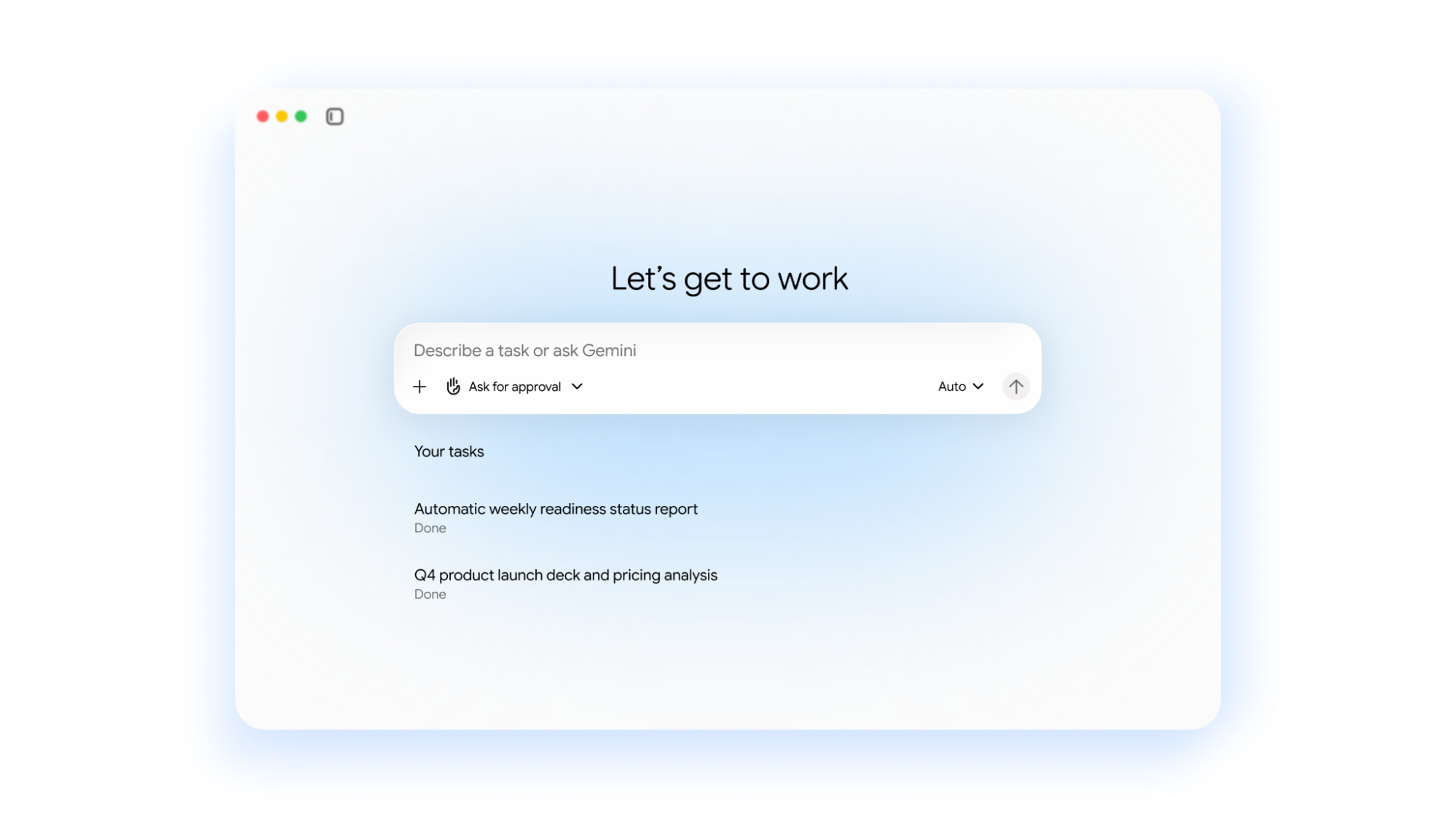
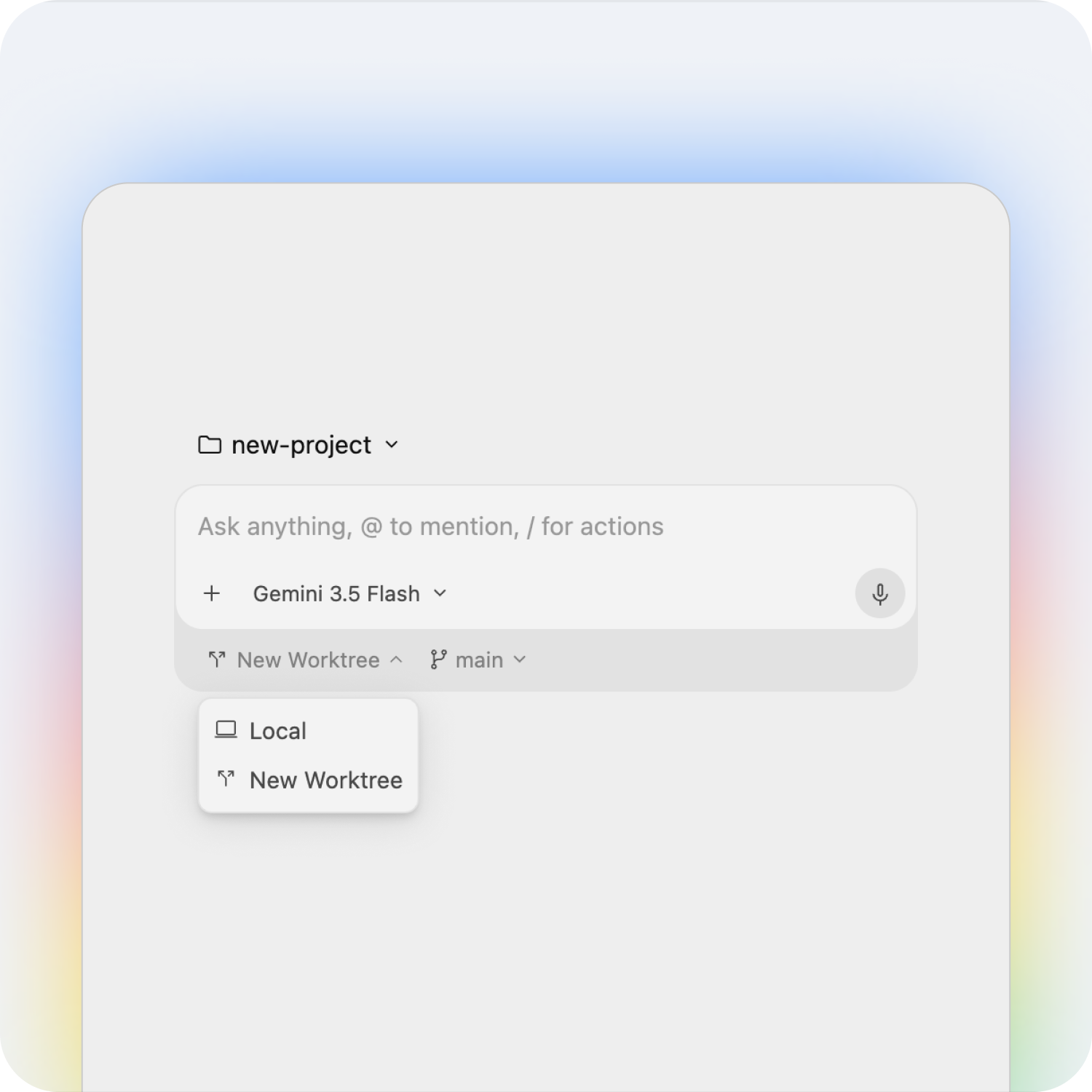
On October 8, Google Cloud CEO Thomas Kurian opened Gemini at Work 2026 by introducing the Gemini agent. It’s one agent that answers questions, runs multi-step work, creates content, and writes code, all from a single prompt box. Google also announced that its business AI products now sit under one name: Gemini.
The timing reflects how far adoption has already moved. Google says nearly 80% of Google Cloud customers now use its AI products. As a Google Cloud Premier Partner, we’ve pulled out the updates that matter most for your business, and what to do about them.
The key announcements
One agent for chat, tasks, and code
You give Gemini an objective, not step-by-step instructions. It plans the work, picks the tools it needs, and comes back with something finished. Because it runs in the cloud, long tasks keep going after you close your laptop, and it keeps the same memory across web, mobile, desktop, and the command line. It also connects to Microsoft 365, Slack, Salesforce, ServiceNow, and any MCP server.
One brand: Gemini
The Gemini Enterprise app, Gemini Enterprise Agent Platform, and Spark are now simply Gemini. Commercial editions keep their names: Gemini Enterprise Business, Standard, and Plus.
Gemini inside Google Workspace
Gemini now works inline in Gmail, Docs, Sheets, Slides, Drive, Chat, and Calendar. Ask it to book time with your usual project team and it works out who they are, checks calendars, and starts the thread. It also flags emails it can handle for you, like a request for a status deck.
Teams can now create coworker agents with their own Workspace account, email, and calendar. Colleagues @mention them in Chat or Docs like anyone else, and they only see what you share with them.
Model choice with hard cost controls
Gemini runs each job on the best-fit model, across Google’s Gemini models and Anthropic’s Claude today. Smart Routing sends routine steps to cheaper models. Real-time spend caps in the Cloud Billing Console pause a project’s agent when it hits its limit, and per-project tracking lets you charge AI spend back to departments.
Security and governance by default
Every agent gets its own identity, least-privilege permissions, and an audit trail. Agents run in an isolated sandbox, and all traffic passes through Agent Gateway, which applies the policies you write once to every agent in the company.
Data and industry skills
Business users can request operational reports in plain language, grounded in BigQuery and the Knowledge Catalog. Saved reports rerun without token costs. Gemini for financial services and Gemini for legal are in preview, with government, healthcare, and retail coming soon.
What this means for your organization
AI at work is moving from drafting help to delegated, finished work. That makes three things matter more than which features you turn on:
Data readiness. Gemini inherits your existing permissions, so oversharing in Drive becomes an AI problem too. Clean sharing and well-defined data come first.
Governance. Agents now act under their own identities. Decide who can create them and what they can touch before teams start building.
Budget. Agent workloads grow fast. Set spend caps and routing per project from day one, not after the first surprise invoice.
How Premier Cloud helps you put Gemini to work
As a Google Cloud Premier Partner, we help teams take Gemini from trial to production. We can help you:
Find the workflows where Gemini pays off first
Tighten Workspace sharing and identity before agents inherit them
Connect Gemini to your systems of record and ground it in your company data
Set up governance, model routing, and spend caps that fit your budget
Train your teams to hand off multi-step work, not just write prompts
Most cloud cost advice still assumes your bill behaves predictably. Traffic goes up, costs go up. Traffic goes down, costs go down. You right-size a few VMs, delete some orphaned disks, and call it optimization.
AI workloads broke that assumption.
A single short prompt can trigger a chain of expensive operations behind the scenes. Requests per second no longer tells you much about what you are about to be charged. A misconfigured retry loop or an unoptimized inference pipeline can burn through a quarter’s budget in an afternoon, and you often will not see it until the invoice reconciles days later.
Google Cloud has shipped three significant changes to its cost management tooling over the past year that address this directly. None of them appear in the standard cost optimization checklist yet. All three are available now, and all three are worth acting on.
Here is what changed, and how to put each one to work.
Strategy 1: Set hard guardrails on AI spend with early anomalies and spend caps
Budget alerts have always had the same flaw. They tell you something went wrong after it went wrong, and then they wait for a human to react. If the spike happens on a Friday night, you find out Monday.
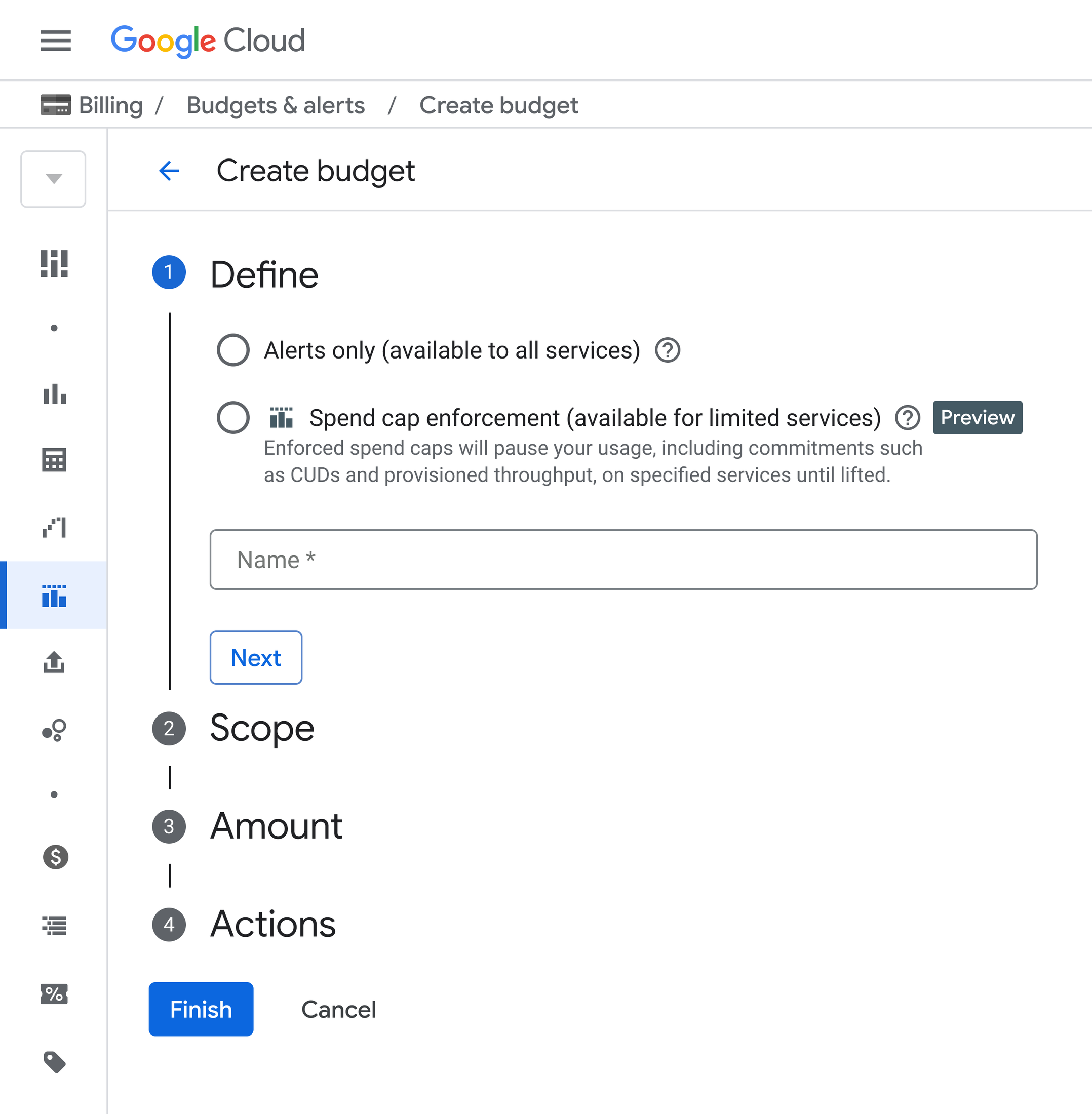
Google Cloud now offers two native features in the Billing console that close that gap: early anomalies on AI services, and spend caps on Google Cloud Budgets. Used together, they give you detection and enforcement instead of detection alone:
Early anomaly detection catches the spike before the invoice does
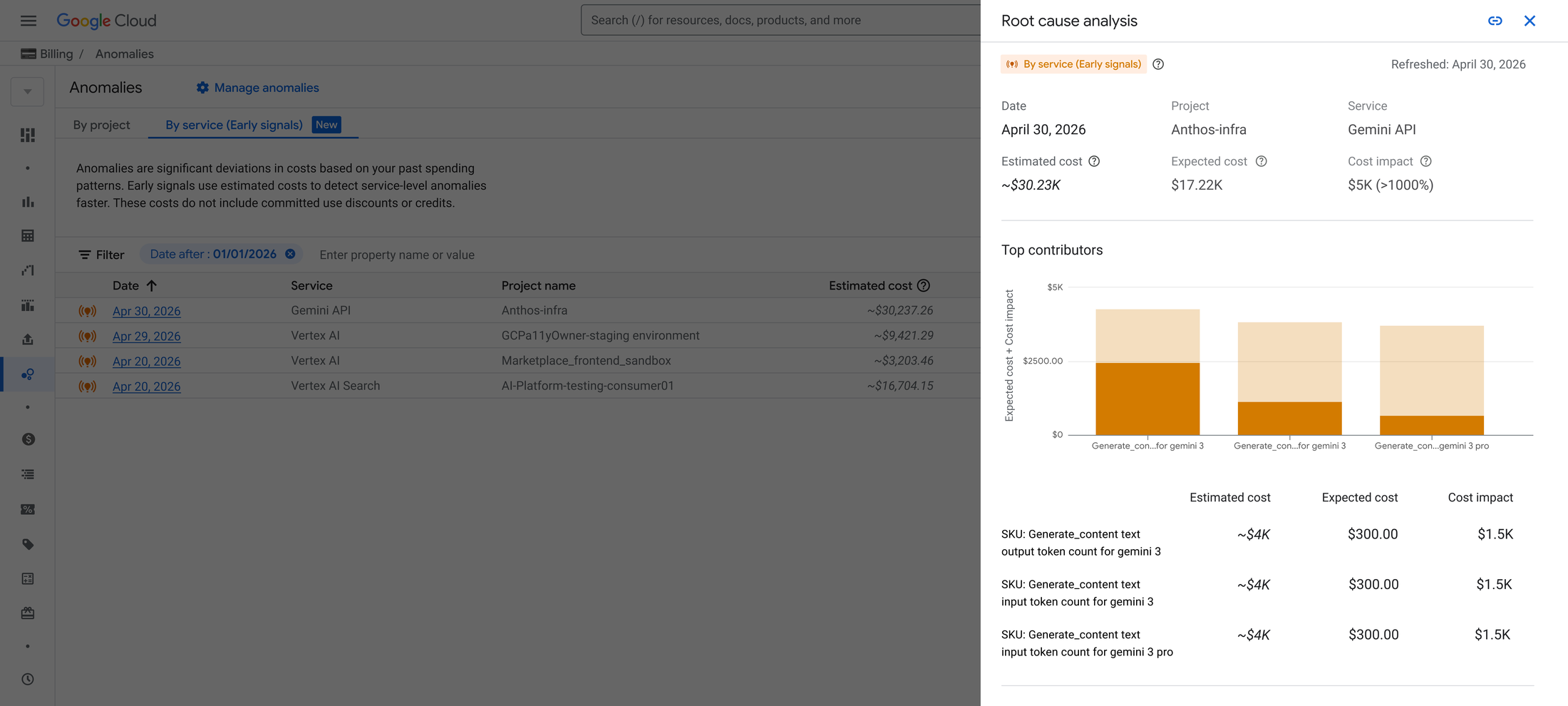
Early anomalies sit inside the Anomalies section of your Billing console and monitor daily service-level costs at the project level. Three things make it different from the standard anomaly detection you may already be using:
It builds its own baseline. The system analyzes your historical project data to establish expected seasonal cost patterns. There are no thresholds to configure and no numbers to guess at.
It works on early cost signals. Rather than waiting for billing data to fully reconcile, it watches cost signals as they emerge and flags movement before the charges are formally reported.
It tells you what caused it. When a daily cost trend looks abnormal, the system generates a root cause analysis identifying the top three SKUs behind the increase. That turns a two-hour investigation into a two-minute one.
The practical value is triage. Once you can see which services swing most unpredictably, you know exactly which ones need a hard limit.
Spend caps actually stop the spending
Spend caps are the enforcement half. You set a monthly ceiling on a specific service within a specific project, and when accumulated spend hits that number, Google Cloud automatically restricts further cost-incurring usage for that service. Nothing else in your environment is affected.
Four details matter if you are considering rolling this out:
It is non-destructive. Your data and resources are untouched. Usage pauses, nothing is deleted.
It escalates before it acts. Billing Administrators and Project Owners get automated email alerts at 50%, 80%, and 100% of budget.
Recovery is one click. When a cap triggers, the block stays until someone manually lifts it in the Budgets UI. That is deliberate, and it is the right default.
It fires fast. Because caps for AI services work off estimated rather than reconciled costs, enforcement happens within minutes of hitting the threshold rather than hours.
One important caveat: spend caps halt new on-demand charges, but fixed commitment fees such as Committed Use Discounts or Provisioned Throughput keep billing at their contractual rate. A cap protects you from runaway usage, not from a commitment you have already made.
Both features are in public preview, currently supporting Gemini API, Agent Platform, Cloud Run, and Cloud Run Functions. During preview, a spend cap applies to a single project and service on a fixed monthly timeframe.
Where to start: apply caps to your development and test environments first. That is where experimentation happens, where runaway jobs originate, and where a pause carries the least production risk.
Strategy 2: Revisit your commitments under the new spend-based CUD model
Committed Use Discounts remain one of the highest-leverage tools available for reducing Google Cloud costs. The problem was never the discount. It was that almost nobody could explain their own savings without a spreadsheet.
Google has now moved spend-based CUDs from a credit-based system to a direct discounted price model, and the change is fully rolled out to all customers.
The math got dramatically simpler
Under the old model, working out what you actually saved required juggling three numbers: the full on-demand cost, the commitment fee, and an offsetting credit. You committed to an hourly on-demand amount, then reverse-engineered the net.
Under the new model, you commit directly to the discounted spend amount and your usage is billed at that rate. Your net cost appears on the dashboard as a single figure. Savings is just the gap between the on-demand price and what you actually paid.
This sounds like a cosmetic change. It is not. Finance teams that could never confidently report cloud savings to leadership can now do it from a single view, which tends to unlock the budget conversation that was previously stuck.
You can now audit your commitments properly
The unified CUD Analysis tool gives you coverage and utilization visibility with hourly granularity for up to 30 days. That granularity matters more than it sounds. Daily averages routinely conceal underutilization that only shows up during specific hours, which means teams have been quietly overcommitting without any signal.
If you want to work with the raw data, there is a spend-based CUD metadata export you can join against your Billing BigQuery Export datasets for programmatic analysis, or a straightforward CSV export from the CUD Analysis view if BigQuery is more than you need.
Cost Reports now include a Savings Programs line that reflects true net savings rather than gross credit. If you are comparing figures from before and after the migration, include both usage SKUs and commitment fee SKUs so you capture the full picture.
Sizing the commitment is less of a guess
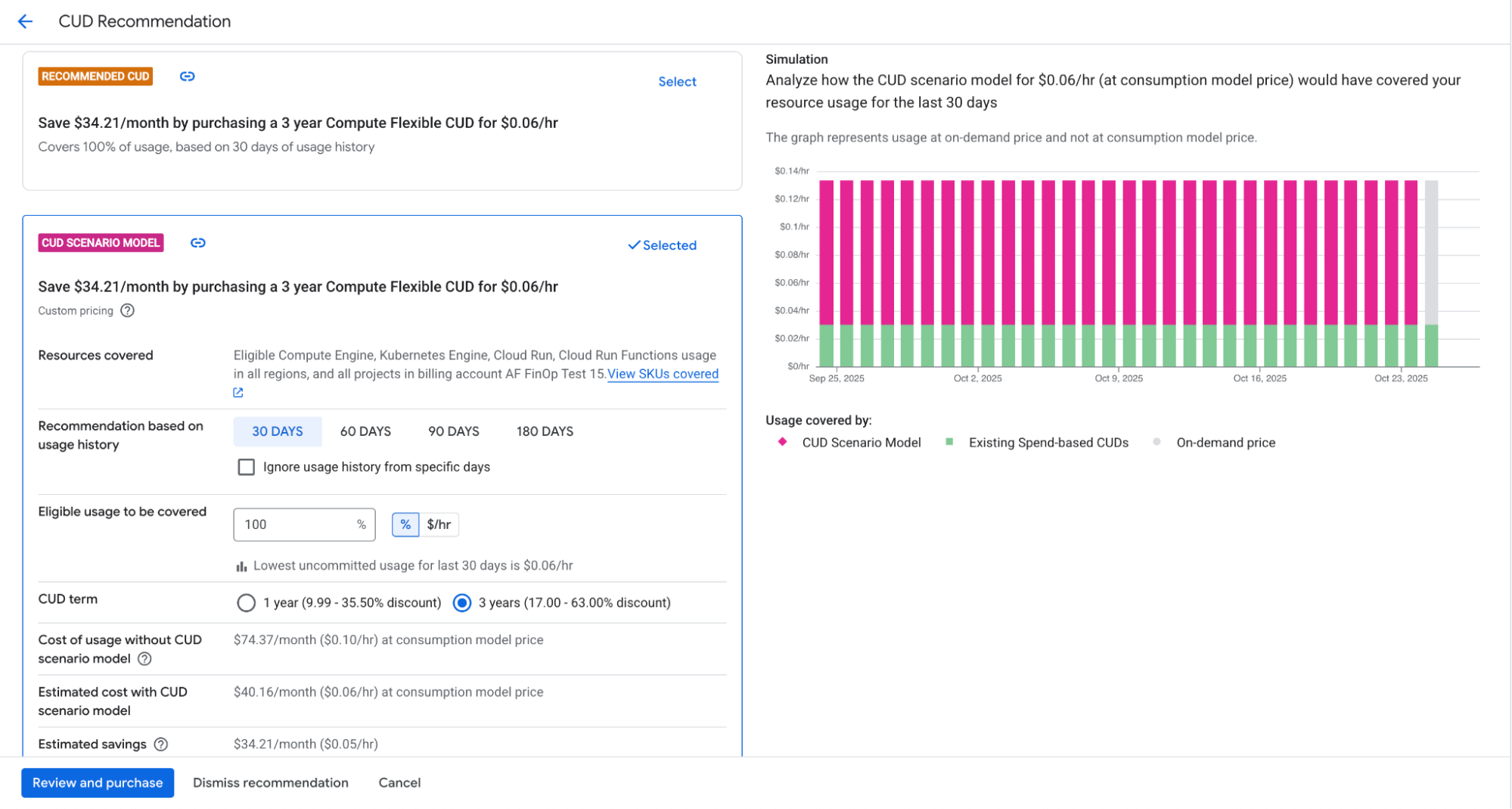
CUD recommendations now factor in data from GKE, Cloud Run, Cloud Run Functions, and Compute Engine, which makes Compute Flexible CUD suggestions considerably more accurate for teams running mixed workloads.
Scenario modeling is the part worth exploring. You can adjust coverage thresholds, exclude dates with irregular usage that would otherwise skew the recommendation, and extend the lookback window up to 180 days. That lets you size a commitment against your actual risk tolerance rather than accepting a default.
Coverage has also expanded to newer SKUs including Cloud Run and H3 and M-series VMs, and a longstanding reporting limitation affecting customers combining Flex CUDs with GKE or Cloud Run CUDs has been resolved.
Where to start: if you purchased commitments before this migration, run a CUD Analysis comparison across the migration date. Confirm your savings held, then re-examine whether your coverage levels still match how your workloads have actually evolved.
Strategy 3: Automate financial governance instead of chasing it
The two strategies above address cost after it has been incurred. This one addresses the conditions that let waste accumulate in the first place.
Every organization running Google Cloud at any real scale hits the same wall: untagged resources nobody can attribute, storage buckets with no lifecycle policy, BigQuery tables retaining data forever, environments that drift from whatever standard was agreed on eighteen months ago. Manual reviews take weeks. By the time an audit finishes, the environment has changed.
Workload Manager lets you codify those policies and enforce them continuously.
What you can automate
Workload Manager validates your workloads against best practices using rules defined in Open Policy Agent (OPA) Rego. You can choose from hundreds of predefined rules authored by Google Cloud covering FinOps, reliability, security, and operations, or write your own.
Cost policies worth automating early:
Requiring labels or tags on specific resource types so cost allocation and showback actually work
Enforcing lifecycle management or Autoclass configuration on every Cloud Storage bucket
Setting appropriate data retention on storage such as BigQuery tables
Disabling simultaneous multi-threading where it reduces licensing costs, for example on SQL Server
Google also recently cut the cost of running Workload Manager by up to 95% for certain scenarios and added a free tier for smaller tests, which removes most of the reason to delay trying it.
How the workflow fits together
Setup follows four steps. You create an evaluation and select your rules, whether predefined, custom, or both. You define scope, which can be your entire organization, specific folders, individual projects, or filtered by resource label or name. You set a schedule ranging from hourly to monthly, configure notifications through email, Slack, or PagerDuty, and export results to a BigQuery dataset. Then the evaluation runs on schedule or on demand, storing a historical record of your compliance posture.
For reporting, connect the BigQuery results to Looker Studio. There is a Google Cloud Workload Manager template in the Looker Studio template gallery that you can point at your own dataset and customize.
The outcome is a shift in how cost governance operates. Instead of one person chasing teams for compliance, policy violations surface automatically to the people who can fix them, with a historical trend line showing whether things are improving.
Where to start: pick a single policy with clear business value, usually mandatory labeling on your highest-spend resource type, and scope it to one folder. Prove the loop works before expanding it organization-wide.
How these three strategies work together
Treated separately, each of these is a useful feature. Treated as a system, they cover the full cost lifecycle:
Layer
Tool
What it does
Prevent
Workload Manager policies
Stops misconfiguration and untracked resources from accumulating
Detect
Early anomalies
Flags abnormal spend before it reaches the invoice
Enforce
Spend caps
Halts runaway usage automatically
Optimize
Spend-based CUDs
Reduces the rate you pay on committed baseline usage
Most organizations we work with have one or two of these layers and assume they are covered. The gap is usually enforcement, which is exactly the layer that AI workloads punish hardest.
Getting started
If you are running meaningful workloads on Google Cloud, here is a reasonable sequence:
Open the Anomalies section of your Billing console and review what early anomaly detection surfaces on your AI services.
Apply spend caps to your development and test projects for the supported services.
Run a CUD Analysis comparison across your migration date and validate that your savings carried over.
Use CUD scenario modeling with a 180-day lookback to check whether your current coverage still fits your usage.
Automate one high-value cost policy in Workload Manager, scoped narrowly, and expand from there.
The tooling is genuinely better than it was a year ago. The harder part is usually not configuration, it is deciding what your policies should be and what level of commitment risk your business can carry.
That is where a partner earns their place. As a Google Cloud Premier Partner, Premier Cloud works with organizations across North America to build cost governance that holds up under real workloads. If your cloud bill is growing faster than your usage, or if AI experimentation is outpacing your ability to track what it costs, we can help you get ahead of it.
Frequently asked questions
What is Google Cloud cost optimization? Google Cloud cost optimization is the practice of reducing cloud spend without compromising performance or availability. It combines visibility into where money is going, structural discounts such as Committed Use Discounts, right-sizing of resources, and governance policies that prevent waste from accumulating.
How do Google Cloud spend caps work? Spend caps let you set a monthly spending ceiling on a specific service within a specific project. When accumulated spend reaches your defined cap, Google Cloud automatically restricts further cost-incurring usage for that service. The action is non-destructive, alerts fire at 50%, 80%, and 100% of budget, and the cap can be lifted with one click from the Budgets UI.
What changed with spend-based Committed Use Discounts? Google Cloud moved spend-based CUDs from a credit-based system to a direct discounted price model. You now commit to a net discounted spend amount and your usage is billed at that rate, so your net cost is visible directly rather than requiring you to reconcile on-demand costs, commitment fees, and credits separately.
Can you set spending limits on the Gemini API? Yes. During the current public preview, spend caps support Gemini API, Agent Platform, Cloud Run, and Cloud Run Functions, applied to a single project and service on a fixed monthly timeframe.
How much can Committed Use Discounts save? Savings depend on your commitment term, coverage level, and workload profile. The CUD Analysis tool and scenario modeling in your Billing console give you a modeled figure based on your actual usage, with lookback windows configurable up to 180 days.
Google Workspace is constantly evolving to make our workflows more seamless, productive, and integrated. In July 2026, several exciting changes were rolled out to help individuals and organizations get more done. Whether you’re organizing meetings, crunching numbers, or drafting documents, these new features will elevate your daily productivity.
Here are 5 new updates to Google Workspace that you need to know about!
1. Better Organization for Google Meet Files in Drive
Say goodbye to digging around for meeting notes and video recordings! Google Meet is making it much easier to find your meeting artifacts in Google Drive.
Following a meeting, all related files—including notes, transcripts, and recordings—are automatically uploaded to a dedicated “Google Meet” folder in the host’s My Drive. Inside that folder, files are neatly organized into specific subfolders for each individual meeting. Even better, any meeting attendees with access will now see shortcuts to these files directly in their own “Google Meet” Drive folders.
2. Generate and Edit Visuals with Gemini in Google Docs
Creating beautiful, context-aware visuals just got a whole lot easier. You can now use Gemini in Google Docs to generate and edit images, diagrams, and infographics right alongside your text!
Because these AI generations leverage the context of your document, you can produce highly relevant visuals without ever leaving Docs or relying on third-party design tools. Plus, you can refine your existing graphics using simple natural language prompts (e.g., “Change the aspect ratio to 16:9” or “Make the style match the document”).
3. A Centralized Hub for Meeting Resources on the Web
Preparing for a meeting shouldn’t feel like a scavenger hunt. To help you stay organized, Google has revamped the Google Meet homepage on the web to act as a centralized hub for all your meeting resources.
This new homepage provides a unified view of your upcoming agenda, meeting descriptions, and calendar attachments. It also makes it incredibly easy to follow through on past meetings by surfacing notes, recordings, and transcripts without having to navigate back to your inbox or calendar. Plus, new week and month navigators allow you to look ahead at your schedule seamlessly.
4. NotebookLM is Now “Gemini Notebook”
Google’s premier AI-powered research tool, NotebookLM, is officially getting a new name: Gemini Notebook.
While it remains a standalone product focused on being your personal AI research assistant, the rebranding reflects its evolution and growing integration across the broader Google ecosystem. Keep an eye out for the new name and updated logo rolling out across your interfaces soon!
5. Import and Create Combo Charts in Google Sheets
For data enthusiasts, Google Sheets has significantly enhanced its support for combo charts, making for a much smoother experience when creating multi-series visualizations.
Users can now natively create new “Combo” chart types (like Clustered Column – Line, or Clustered Column – Line on a Secondary Axis) to visualize complex datasets with different scales and metrics without manual re-plotting workarounds. Additionally, Sheets has improved its Microsoft Excel import compatibility, ensuring that external files with combo charts and secondary axes retain their formatting perfectly when uploaded.
The landscape of software development is rapidly shifting from manually writing code to orchestrating agentic systems that autonomously build, test, and deploy software. To navigate this shift, organizations need more than just AI-assisted coding tools; they need a governed, scalable platform. Enter Google Antigravity, an agent-first platform designed to power the next era of development and automation.
This guide explores the value of Google Antigravity and how technical and non-technical decision-makers can leverage it within their enterprises.
The Value of Google Antigravity
For business leaders and enterprise architects, scaling AI presents challenges in security, cost predictability, and governance. Google Antigravity solves these bottlenecks by offering an end-to-end platform with several core benefits:
Unmatched Efficiency and Lower Costs: Antigravity is co-optimized for the Gemini 3 family of models, notably Gemini 3.5 Flash. This optimization allows the Antigravity agent harness to deliver results faster and with a much lower compute footprint, operating at one-third the cost of earlier models. Because it is highly token-efficient, teams can execute longer, complex workflows before hitting rate limits.
Enterprise-Grade Security and Data Privacy: When used via the Gemini Enterprise Agent Platform, Antigravity usage is governed by standard Google Cloud Terms of Service. This ensures your proprietary data remains within your secure cloud boundary and under your control, with no risk of Google training on your private customer data.
Predictable Cost Controls: Administrators maintain strict oversight. The platform allows admins to set project-level cost limits and budget alerts, ensuring AI initiatives scale without spiraling costs. You can also choose between standard Pay-As-You-Go models or Provisioned Throughput for critical traffic needing assured capacity.
Real-World Acceleration: Companies like PwC and Monks report that Antigravity fundamentally shifts their teams from simple code completion to high-level orchestration, eliminating traditional development friction and accelerating the delivery of custom client solutions.
How Should You Use It?
Google Antigravity meets developers where they are by providing two primary, seamlessly connected interfaces:
1. Antigravity 2.0 (The Visual Orchestrator) This standalone desktop application is a dedicated mission control for builders and non-traditional developers.
Subagents: You can delegate complex workflows to focused subagents that work in parallel on specialized tasks.
Scheduled Tasks: Put agents on autopilot using cron schedules to execute routine tasks in the background.
Voice Commands: Describe what you need in plain language, powered by Gemini’s advanced audio understanding.
2. Antigravity CLI (The Terminal Experience): For engineers who prefer the command line, the CLI brings the same powerful agent harness directly to their terminal.
High Velocity: It is optimized for maximum speed and lower overhead, allowing rapid building and testing of workflows.
Custom Slash Commands: You can define custom skills in your workspace that automatically register as native slash commands, turning team playbooks into executable actions.
3. Antigravity IDE (The Fully Featured Environment) The Antigravity IDE is a fully featured, agentic development environment complete with an agent manager, custom artifacts, and a deep understanding of your codebase. It allows everyday engineers to instantly refactor legacy code and generate corresponding unit tests directly where they work.
Note: The IDE currently operates under the consumer Antigravity Terms of Service and is not yet supported via Google Cloud Terms of Service. Future IDE extensions and enterprise support will be made available via the Gemini Enterprise Agent Platform.
4. Antigravity SDK (The Custom Agent Engine) The SDK provides programmatic access to the Antigravity harness, allowing developers to prototype custom agents with minimal code. Using simple Python scripts, you can define custom agent behaviors, run evaluations, and host applications on your own infrastructure.
Note: The SDK is initially targeted at researchers and is not currently available via the Gemini Enterprise Agent Platform.
Empowering Every Role: Different parts of your engineering organization will use Antigravity to solve unique problems:
The Platform Engineer can use the CLI and Agent Registry to securely wrap internal scripts into governed agents, applying strict guardrails before they are discovered by the wider team.
The Agent Developer can build custom agents to autonomously handle complex multi-step pull request reviews, verifying links and suggesting code revisions.
Real-World Enterprise Use Cases
Google Antigravity is built to support distinct workflows across the entire engineering organization:
The Everyday Engineer can leverage Antigravity to instantly refactor legacy code and generate comprehensive unit tests right alongside their daily work.
The Agent Developer can construct custom agents to automate complex multi-step pull request reviews, reading code changes and suggesting revisions autonomously.
The Platform Engineer can securely wrap internal scripts into governed agents, ensuring strict guardrails are applied before they are discovered and used by the broader team.
Global enterprises are already proving the value. Leaders from companies like PwC and Monks report that Antigravity has fundamentally shifted their teams from simple code completion to high-level orchestration, allowing them to run continuous engineering pipelines in the background, eliminate development friction, and deliver custom solutions at unprecedented speeds.
The Everyday Engineer: can leverage Antigravity to instantly refactor legacy code and generate comprehensive unit tests right alongside their daily work.
The Agent Developer: can construct custom agents to automate complex multi-step pull request reviews, reading code changes and suggesting revisions autonomously.
The Platform Engineer: can securely wrap internal scripts into governed agents, ensuring strict guardrails are applied before they are discovered and used by the broader team.
Global enterprises are already proving the value. Leaders from companies like PwC and Monks report that Antigravity has fundamentally shifted their teams from simple code completion to high-level orchestration, allowing them to run continuous engineering pipelines in the background, eliminate development friction, and deliver custom solutions at unprecedented speeds.
Step-by-Step Guide to Getting Started
Adopting Google Antigravity is designed to be a quick and frictionless process for Cloud customers.
For Google Cloud Admins:
Activate the aiplatform.googleapis.com API within your Google Cloud project.
Assign the necessary IAM roles to developers—specifically, the Agent Platform User role is required to access the system.
Establish observability and set project-level budget alerts to maintain control over expenditures.
For Enterprise Developers and Users:
Download Google Antigravity and log in to the desktop application or CLI using your standard Cloud Identity OAuth credentials.
Accept the Google Cloud Terms of Service and specify your Google Cloud project ID and location.
Start running tasks. Your context, settings, and conversation history will seamlessly follow you whether you are orchestrating visually in Antigravity 2.0 or executing commands in the CLI.
VICTORIA, BC. June 9, 2026 — CRN has announced Premier Cloud in 486th place on the 2026 CRN Solution Provider 500 list.
CRN’s annual Solution Provider 500 list ranks the top revenue-generating IT services firms in North America. This prestigious index highlights the major technology channel players driving global industry expansion and innovation.
“The Solution Provider 500 list highlights those companies generating the highest revenue through leadership in business and service innovation,” said Jennifer Follett, Vice President, U.S. Content, Executive Editor at CRN, The Channel Company. “This recognition highlights those organizations that consistently demonstrate agility and sustained growth amid rapidly evolving industry demands and technological change. Congratulations to every company that earned a well-deserved place on this year’s Solution Provider 500.”
As IT environments become more sophisticated and technologies such as AI continue to reshape how businesses operate, customers need trusted partners who bring both strategic guidance and hands-on technical expertise. Premier Cloud remains focused on helping organizations navigate this complexity with secure, scalable, and innovative cloud and AI solutions.
Looking ahead, we remain focused on building innovative solutions on Google Cloud, fostering strategic partnerships, and delivering the high-impact results that define our clients’ success.
Premier Cloud is proud to share that we have been named to CRN’s 2026 Tech Elite 250, an annual list recognizing solution providers across the U.S. and Canada that distinguish themselves through advanced technical certifications, specializations, and expertise from leading technology vendors.
The Tech Elite 250 highlights companies that demonstrate a strong commitment to excellence in areas such as artificial intelligence, infrastructure, cloud, and security. For Premier Cloud, this recognition reflects our continued investment in the skills, partnerships, and technical capabilities required to help organizations modernize, scale, and solve complex business challenges with confidence.
As IT environments become more sophisticated and technologies such as AI continue to reshape how businesses operate, customers need trusted partners who bring both strategic guidance and hands-on technical expertise. Premier Cloud remains focused on helping organizations navigate this complexity with secure, scalable, and innovative cloud solutions.
Being included on CRN’s Tech Elite 250 is a meaningful acknowledgment of the work our team does every day to deliver high-impact outcomes for customers. It also reinforces our commitment to maintaining the certifications, training, and vendor specializations that enable us to provide expert support across today’s evolving technology landscape.
The world of artificial intelligence is moving fast. Not long ago, we were impressed by AI that could answer questions. Now, we’re on the cusp of a new era where AI can do things for us. This is the shift from AI as an information tool to AI as a teammate. And at the forefront of this transformation is the new Gemini Enterprise.
If you’re wondering what this means for your business, you’ve come to the right place. In this post, we’ll break down what’s new in Gemini Enterprise and, more importantly, why you should care.
One Platform, Two Powerhouses: Agent Platform and the Gemini App
At its core, the new Gemini Enterprise is an end-to-end system designed for this new “agentic” era of AI. It’s composed of two main parts:
Gemini Enterprise Agent Platform: Think of this as the engine room. It’s the evolution of Vertex AI, providing a comprehensive environment for developers to build, scale, govern, and optimize AI agents.
Gemini Enterprise app: This is the bridge between the powerful AI agents and your team. It’s a single, secure place where employees can discover, create, and use AI agents to get work done.
Together, these two components create a unified system that allows your business to harness the power of AI agents in a secure and scalable way.
Build, Scale, and Govern: A New Era of AI Development
One of the biggest challenges with AI has been moving from exciting demos to real-world business applications that are secure and reliable. Gemini Enterprise addresses this head-on with a suite of new capabilities:
For the Builders: Tools for Every Skill Level
Whether you have a team of expert AI developers or want to empower your business users to create their own solutions, Gemini Enterprise has you covered.
Agent Development Kit (ADK): For your technical teams, the enhanced ADK provides a powerful, code-first environment to build sophisticated, multi-agent systems.
Agent Studio: For those who prefer a more visual approach, Agent Studio offers a low-code interface to build and deploy agents quickly.
This flexibility means you can get from idea to production in hours, not months, and unlock the creativity of your entire team.
For the Strategists: Scaling with Confidence
Building an agent is one thing; deploying and managing a fleet of them is another. Gemini Enterprise provides the infrastructure to do just that.
Agent Runtime: This allows for long-running agents that can work autonomously for days on complex, multi-step tasks.
Memory Bank: This gives agents long-term memory, allowing them to remember user preferences and past interactions for more personalized and effective assistance.
These features enable you to move beyond simple, one-off tasks and start automating entire business processes, like sales prospecting or financial reconciliation.
For the Guardians: Security and Governance by Design
As AI becomes more integrated into your business, security and governance become paramount. Gemini Enterprise is built with this in mind, offering a range of features to give you peace of mind.
Agent Identity: Every agent is assigned a unique, verifiable identity, creating a clear audit trail for every action.
Agent Registry: This provides a central library of approved agents and tools, so you know your team is using trusted, vetted resources.
Agent Gateway: This acts as a central control point, enforcing security policies and preventing data leakage.
With these features, you can embrace the power of AI without sacrificing control or security.
The Bottom Line: What This Means for Your Business
So, what does all this new technology mean for your bottom line? Here are a few of the business outcomes you can expect:
Increased Productivity: By automating complex, multi-step processes, you can free up your team to focus on more strategic, high-value work.
Faster Innovation: With tools that make it easier to build and deploy AI solutions, you can bring new products and services to market faster.
Improved Decision-Making: By giving your team access to AI-powered insights, you can make faster, more data-driven decisions.
Enhanced Customer Experience: By using AI agents to provide more personalized and efficient service, you can improve customer satisfaction and loyalty.
The new Gemini Enterprise is more than just a new set of tools; it’s a new way of working. It’s about empowering your entire organization to leverage the power of AI to drive real business results. The age of the AI agent is here, and with Gemini Enterprise, your business can be ready for it.
Welcome to the Agentic Era. For organizations already deeply invested in Google Cloud Platform and Google Workspace, the experimental phase of artificial intelligence is firmly in the rearview mirror. At Google Cloud Next 2026 in Las Vegas, the narrative officially shifted from isolated generative AI chatbots to fully integrated, semi-autonomous “agentic systems” capable of running entire workflows.
For technology leaders whose primary concerns are establishing ironclad security, optimizing cloud costs (FinOps), and streamlining complex cloud migrations, Next ’26 delivered a cohesive, highly actionable blueprint. Google is no longer just offering tools; it is providing the end-to-end connective tissue needed to deploy a digital taskforce securely and at scale. Here is a comprehensive deep dive into the most critical announcements across Gemini Enterprise, Google Workspace, and Google Cloud Security.
Gemini Enterprise: The Engine for Agentic Operations
Google is unifying its AI portfolio to help enterprises transition from simply answering prompts to delegating full business outcomes. Gemini Enterprise provides a single environment for teams to build, scale, govern, and optimize their AI agents.
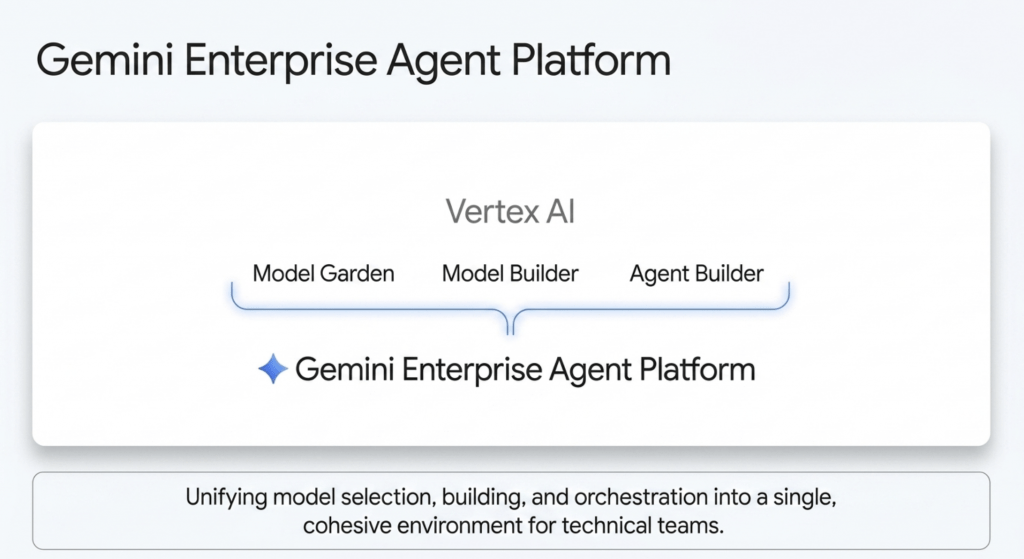
Gemini Enterprise Agent Platform: Representing the evolution of Vertex AI, the Gemini Enterprise Agent Platform is the comprehensive foundation for technical teams. It combines the model selection and building capabilities that developers already rely on with powerful new features for orchestration, security, and DevOps. To directly address the growing need for strict FinOps and cost optimization, Google also introduced proactive cost anomalies detection. A new, dedicated FinOps agent autonomously analyzes spending spikes across your environment and generates highly granular cost reports on demand, ensuring your AI scaling doesn’t lead to unexpected budget overruns.
Gemini Enterprise App: For the everyday workforce, the Gemini Enterprise App serves as the new collaborative “front door” to AI. It is designed to empower non-technical employees to build and manage their own digital assistants.
Agent Designer: This no-code visual builder allows business users to create sophisticated, multi-system workflows using simple natural language. Employees can now build agents that trigger automatically based on specific events or run on a set schedule without writing a single line of code.
Inbox in Gemini Enterprise: As employees deploy more long-running agents to handle tasks like financial reconciliation or sales sequencing, they need a way to track them. The new Inbox acts as a unified hub to monitor active workflows, adjust configurations, and receive real-time status alerts, ensuring automated processes always stay on track.
Projects: To solve the problem of context loss, Projects creates a persistent, data-grounded knowledge base for your team. It serves as a secure “shared brain” that grounds the AI strictly in explicitly added files and conversations. This ensures that critical project intelligence remains a permanent company asset, providing true operational continuity even as team members change roles.
Gemini Enterprise for Customer Experience (CX) Designed to seamlessly unify the shopping and service journey, this suite ensures a frictionless customer experience from product discovery to post-sale support.
CX Agent Studio: A low-code visual builder that allows teams to design empathetic, highly multimodal agents grounded entirely in your enterprise data.
Omnichannel Gateway: This guarantees that a customer’s context travels flawlessly across web, mobile, voice, and social channels without any lag or repetition. The return on investment here is already proven; for example, Best Buy utilized these tools to increase their customer self-service rates by a staggering 200% by having agents engage in precise, long-format troubleshooting.
Google Workspace: Reimagining Enterprise Productivity
For the billions of users relying on Google Workspace, AI is transforming the suite from a collection of static applications into a dynamic, interconnected ecosystem.
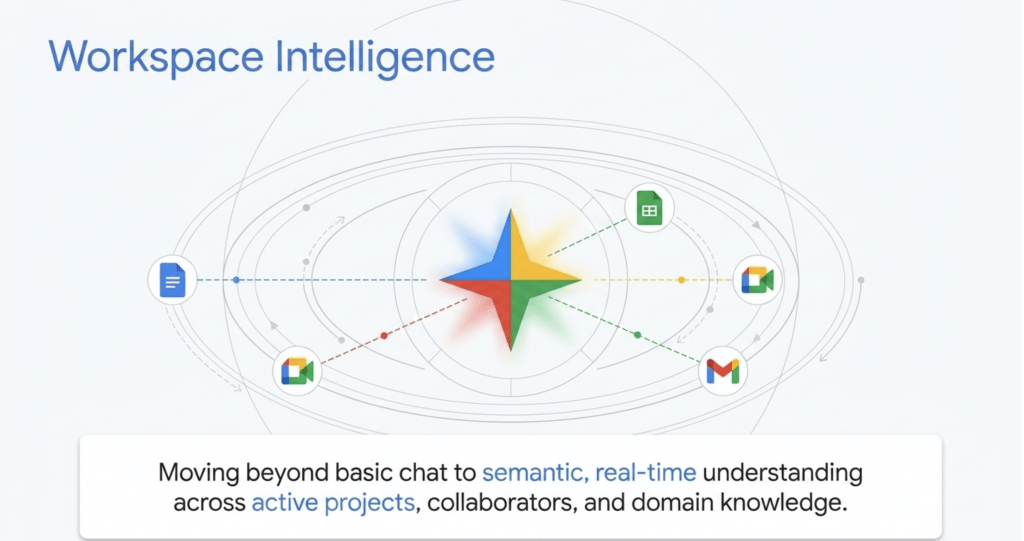
Workspace Intelligence: The cornerstone of this transformation is Workspace Intelligence, a new, unified semantic layer. Instead of forcing users to manually copy and paste context into every single prompt, Workspace Intelligence inherently understands the complex relationships within your specific work ecosystem. It securely maps your active projects, your frequent collaborators, and the domain knowledge living across Docs, Slides, and Gmail. This allows the AI to do the heavy lifting of gathering context across silos, safely providing personalized, highly relevant outputs.
New AI Features in Google Workspace
Ask Gemini in Google Chat: Your Chat window is now a unified command line for all of your work. It provides a daily briefing that surfaces important tasks and unread threads. Crucially, with expanded third-party connectors (like Asana, Jira, and Salesforce), Ask Gemini bridges the gap between your Workspace content and external tools, allowing you to find information across your entire tech stack without leaving the conversation.
Docs: Gemini can now automatically generate infographics, edit multiple images simultaneously, and automatically triage or edit documents based on user comments.
Slides: You can now generate full, editable presentation decks in one shot, with the AI strictly adhering to your company’s official templates and styles.
Sheets: A new Interactive Canvas allows you to use natural language to build interactive mini-apps—like kanban boards and custom dashboards—directly on top of your live data.
Drive: Drive Insights and Projects centrally organize files to give Gemini full context, allowing you to instantly extract insights across your entire drive using AI Overviews.
Vids: You can now quickly convert presentations into videos featuring highly realistic, fully branded AI avatars, complete with custom company logos and backdrops.
Workspace MCP Server: Currently in public preview, the Workspace Model Context Protocol (MCP) Server allows developers to safely bring advanced Workspace capabilities—like synthesizing Drive documents or drafting Gmail responses—directly into their own custom AI applications and agents using a secure, open framework.
Rapid Enterprise Migration: For organizations looking to move away from legacy tools, migrating your entire organization from Microsoft 365 to Google Workspace is now up to five times faster. This is powered by a new cloud-based data import service built directly into the admin console. To ensure there is no friction when collaborating with external partners still using Office, Google has also added improved interoperability features like an AI-powered Office macro converter, native Office file editing in Gmail, and redlining in Docs.
Agentic Defense: Securing the Autonomous Frontier
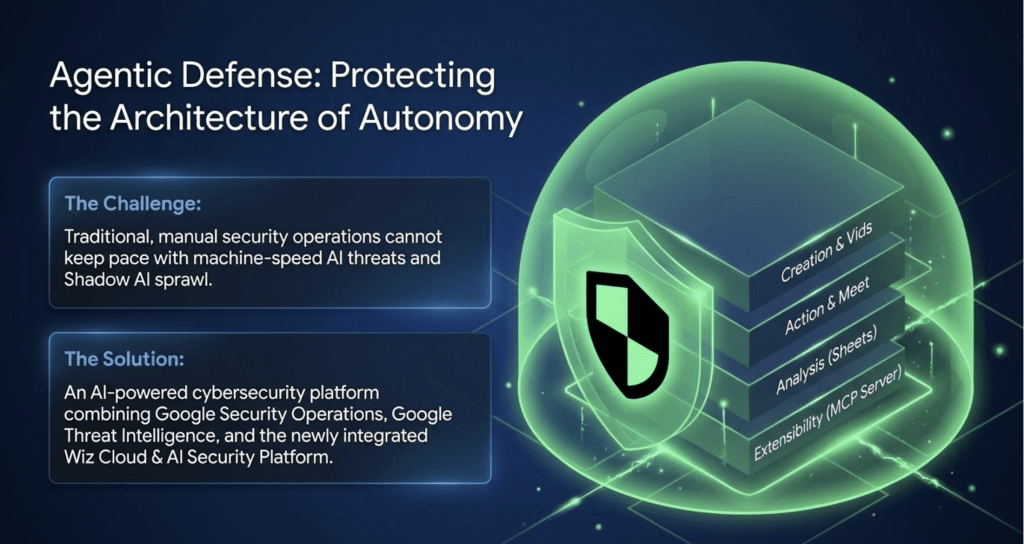
As AI accelerates business operations, it simultaneously accelerates the speed of malicious actors. At Next ’26, Google revealed that adversaries have reduced the time it takes to move from initial access to a threat hand-off from eight hours down to a terrifying 22 seconds. To combat this, human defenders require AI that operates at machine speed.
Wiz AI-Application Protection Following its deep integration into the Google Cloud ecosystem, Wiz introduced a comprehensive suite to secure the entire AI development lifecycle. A standout capability is the AI-Bill of Materials (AI-BOM). This dynamic tool automatically inventories all AI frameworks, language models, and IDE extensions across your multicloud environment. It provides absolute visibility into what is writing code in your stack, tracking sanctioned tools while aggressively uncovering and flagging unapproved “shadow AI” plugins. Furthermore, Wiz now offers inline security scanning that natively protects vibe-coded applications, surfacing vulnerabilities before they ever reach production.
Securing Agents and the Agentic Web: To ensure that autonomous agents operate within strict, governed boundaries, Google introduced several foundational security layers. Agent Identity provides every digital worker with a unique cryptographic identity, allowing for precise, scoped human delegation and access management. Agent Gateway acts as a centralized air-traffic controller, enforcing strict security policies across all agent-to-agent and agent-to-tool communications. Finally, Model Armor integrates directly with Agent Gateway to provide robust runtime protection against emerging threats like prompt injections and sensitive data leakage.
Agentic Threat Intelligence: To shift security from reactive to proactive, Google Security Operations introduced three new specialized, autonomous defenders.
Google Cloud Fraud Defense: As commerce becomes increasingly automated, identifying who—or what—is interacting with your systems is paramount. In a major evolution of reCAPTCHA, Google launched Fraud Defense. This unified trust platform is explicitly engineered for the agentic web, capable of discerning the subtle differences between human users, malicious botnets, and authorized, helpful AI agents, effectively securing the digital journey from registration through to final payment.
The Agentic Data Cloud: Fueling Autonomous Action
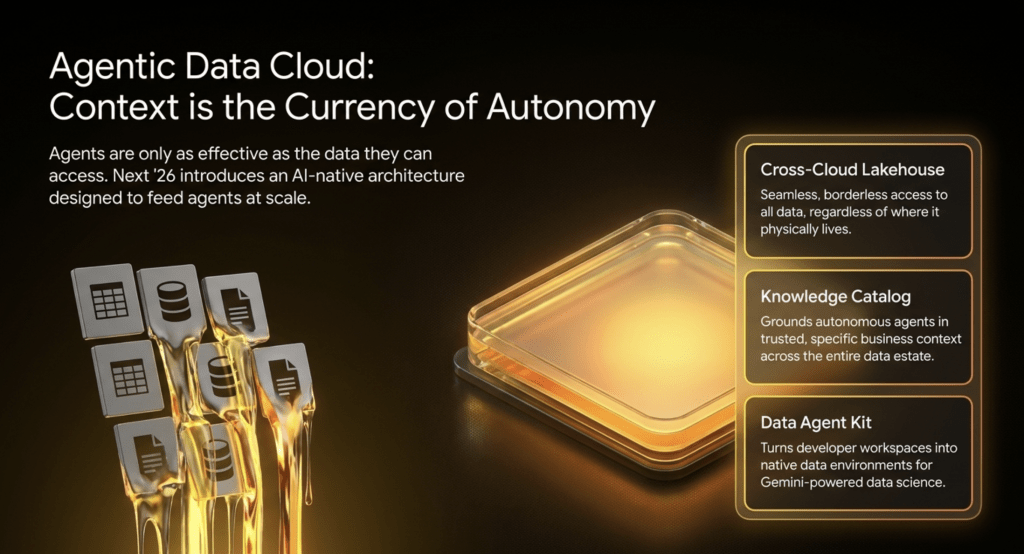
In the agentic era, an AI agent is only as smart as the data it understands. Google’s Agentic Data Cloud unifies your operational databases, analytical lakehouses, and AI models so your digital taskforce is grounded in absolute enterprise truth—without causing cloud costs to spiral.
Here are the core upgrades:
Knowledge Catalog (Governance): This replaces static data dictionaries with a dynamic, universal context engine. It autonomously maps your business logic and permissions without moving a single byte of data, ensuring agents execute tasks accurately based on your company’s unique lingo.
Cross-Cloud Lakehouse (Migration): Standardized on open Apache Iceberg, this allows you to instantly query data across Google Cloud, AWS, and Azure. It provides zero-copy, zero-ETL access, completely eliminating the latency and massive egress fees normally associated with cross-cloud data.
BigQuery Fluid Scaling (FinOps): Built for unpredictable agentic workloads, BigQuery now adapts dynamically with true per-second billing and zero minimums. This structural change delivers up to 34% in immediate cost savings for enterprise FinOps teams.
The Data Agent Kit: This shifts data engineering teams away from writing manual pipelines and toward agent orchestration. It turns any developer workspace into a native data environment to autonomously generate production-ready code.
Conversational BI with Looker: Looker introduces Dashboard Agents that allow everyday users to ask natural language questions directly within their dashboards, delivering answers that are strictly governed by your enterprise semantic layer.
AlloyDB AI at Massive Scale: To support the performance demands of enterprise AI, AlloyDB AI now scales to support over 10 billion vectors. It can process 100,000 rows per second for less than a tenth of a cent, bringing unprecedented cost-efficiency to operational databases.
Conclusion
Google Cloud Next 2026 proved that the infrastructure, intelligence, and security layers required for enterprise-grade AI are now fully integrated. By combining the unified context of Workspace Intelligence, the orchestration power of the Gemini Enterprise Agent Platform, and the machine-speed protection of Agentic Defense, Google Cloud has provided mature organizations with the exact tools they need to safely modernize their legacy systems, optimize their FinOps, and unleash the true ROI of artificial intelligence.